Getting your Lao video content translated into English is about more than just switching out words. For video, everything from context and cultural nuance to basic accessibility is on the line. It’s about building a bridge so your message can travel from Lao-speaking communities to a global, English-speaking audience, creating all sorts of new chances for connection.
Why Accurate Lao to English Translation Matters for Video
Before you even start, it helps to know why you’re translating. There's a growing need for Lao to English translation, driven by creators who want to connect with more people on a much deeper level. For them, it’s about taking their content from a local stage to a worldwide one.
Think about a Lao health educator on YouTube. With good English subtitles, their wellness tutorials suddenly become accessible to millions of new viewers who were missing out before. Or a podcaster sharing incredible local Lao stories—they can now find listeners on completely different continents, sparking genuine cultural exchange.
Bridging Critical Communication Gaps
This isn't just about entertainment. In places with large Lao-speaking communities, like California, clear communication can be a lifeline. In areas like healthcare and legal services, language barriers can create serious problems.
California is a perfect example. Despite its multicultural fabric, the Lao language is one of the most under-represented in the state's physician workforce. This gap leaves a huge need for accurate translation in healthcare videos and public service announcements.
A 2022 AltaMed study, analyzing U.S. Census data, found that while 44.6% of Californians speak a language other than English at home, the Lao-speaking community remains one of the most underserved Limited English Proficient (LEP) groups.
This is exactly where modern tools come in. They do more than just swap text; they offer a full video localization suite, from subtitles to AI-powered dubbing.
The Modern Solution for Video Localization
Platforms like TranslateMom were built to handle this very challenge. Instead of treating translation as a simple text-in, text-out task, these tools give you a full studio environment to manage your video projects from beginning to end.
The whole workflow is designed with creators in mind:
- Easy Import: Kick things off by dragging your video file right into the browser. Or, just paste a link from YouTube or TikTok. No fuss.
- Simple Setup: Once your video is loaded, just tell the tool the source is Lao and the target is English.
- Flexible Services: Then, pick what you need. Do you want to generate captions, translate them into English subtitles, or go all out with a full AI audio dub? The choice is yours.
This approach hands the power back to creators. You can produce professional-quality translated videos without needing a whole team of specialists. It opens the doors for anyone to get their content ready for an international audience, and quickly. For a deeper dive into the nitty-gritty, check out our guide on subtitling and translation best practices.
Choosing Your Translation Workflow: Manual vs. AI
Okay, so before you dive into translating your Lao video into English, you've got a big decision to make: how are you going to do it? Your choice between going old-school with a manual translator or using a slick AI-powered tool will pretty much define your project's speed, cost, and the final vibe of your subtitles.
Each path has its place, and one isn't always better than the other. It really depends on what you're trying to achieve.
The Case for a Human Touch
Hiring a freelance translator means you're getting deep cultural and linguistic know-how. A real person can pick up on subtle jokes, local idioms, and regional slang that an algorithm might just steamroll over.
This is the go-to approach for super important stuff—think legal depositions, big-budget films, or anything where a single misinterpreted word could cause a huge headache. The downside? That level of precision takes time and costs more. Finding the right person, getting them up to speed, and waiting for the translation can take days, and professional rates can be a real budget-killer for smaller creators.
The Rise of AI-Powered Solutions
On the flip side, AI translation platforms are lightning-fast. Got a quick clip for social media or an internal training video that needs to be done yesterday? AI can spit out a draft translation in minutes. For creators on a tight schedule, this is a game-changer.
And we've moved way beyond the clunky, word-for-word translation of the past. Modern tools like TranslateMom give you a hybrid approach that blends the raw speed of AI with a powerful editing suite.
Here’s how simple the TranslateMom workflow is:
- Start a New Task: Simply upload your video file directly or just paste in a link from YouTube, TikTok, or Instagram.
- Set your languages: Pick Lao as the Source Language and English as the Target Language.
- Pick your service: Choose the Translation service to get your subtitles generated automatically.
But here’s the real magic: the AI gives you a solid first draft, and then you jump into the Studio Workspace to polish it up. This "human-in-the-loop" model really does give you the best of both worlds.
Making the Right Choice for Your Content
Let's break down the practical differences to help you decide which route is best for your Lao video project.
Translation Method Comparison Lao to English
| Feature | Manual Translation (Freelancer) | AI Translation (e.g., TranslateMom) |
|---|---|---|
| Speed | Slow (Days to weeks) | Extremely Fast (Minutes) |
| Cost | High ($$$-$$$$) | Low & affordable |
| Accuracy | High, especially for nuance | Very good, but may need human review |
| Cultural Context | Excellent, captures idioms/slang | Good, but can miss subtleties |
| Best For | Feature films, legal, marketing | Social media, vlogs, internal videos |
| Workflow | Communication-heavy | Self-serve, on-demand |
So, which is the winner? It really boils down to your specific needs.
For a short, informal video you're posting on social, an AI translation with a quick once-over from you is probably all you need. But if you're working on a detailed documentary or an educational series, using an AI tool for the heavy lifting and then bringing in a native speaker for a final polish is a seriously smart and efficient strategy.
Thinking through these options ahead of time is key. It's always worth exploring AI vs. human expert document translation services to get a fuller picture. This helps you find that sweet spot between quality, budget, and your deadline.
Kicking Off Your Lao Video Translation
Alright, this is where the magic happens. Let's walk through the actual process of getting your Lao video translated into English using a tool like TranslateMom. My goal here is to show you how a task that seems pretty complicated can actually be broken down into a few simple steps.
First things first, you need to get your video into the system. It's designed to be super straightforward. When you hit the New Task screen, you've got two easy options. You can drag and drop your video file right into the browser—it handles hefty files up to 5GB—or just paste in a URL from places like YouTube, TikTok, or Instagram. The app just pulls it in automatically.
The flowchart below gives you a nice visual of the different routes you can take. You can go fully manual, full AI, or a mix of both.
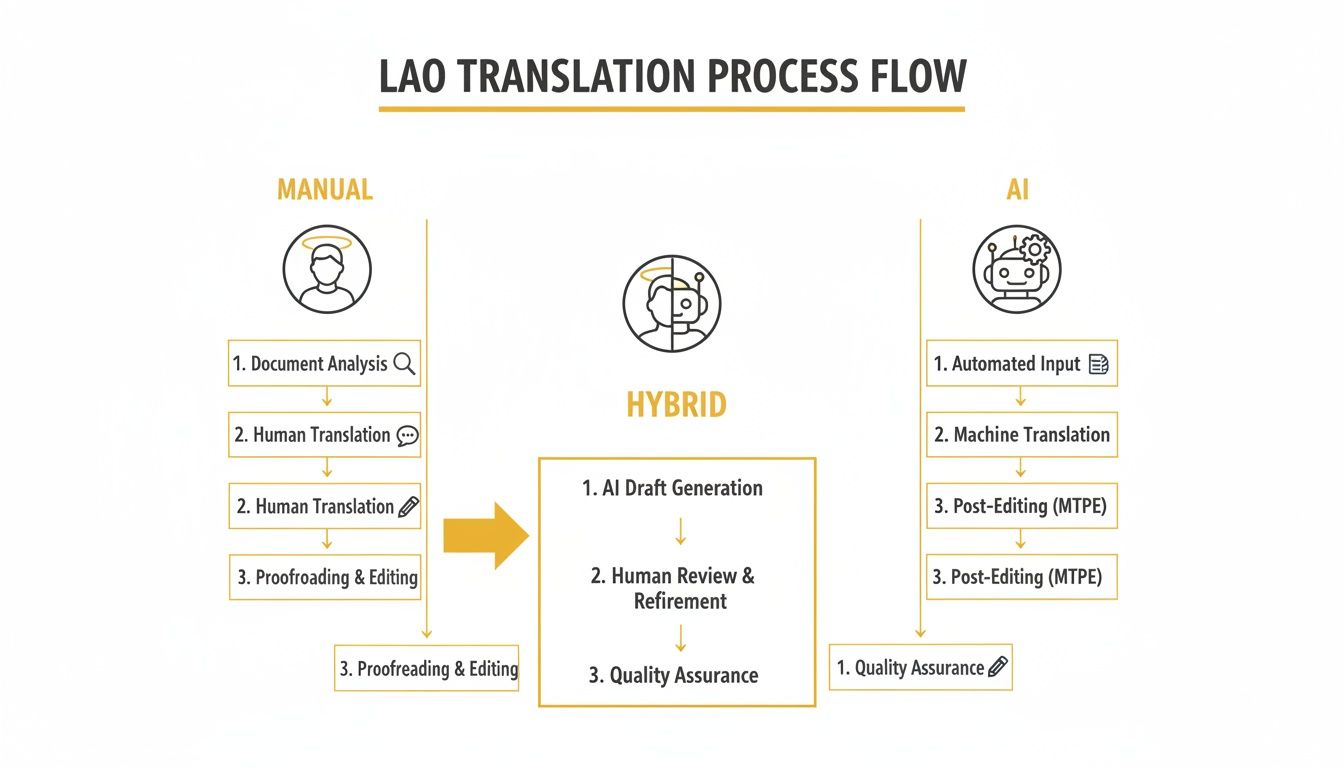
From my experience, that hybrid workflow—where you let the AI do the heavy lifting and a human comes in to polish it up—is usually the sweet spot for most creators. You get speed and accuracy all in one.
Setting Up Your Translation Job
Once your video is uploaded, it's time to tell the system exactly what you want it to do. Getting these settings right from the start is key to making sure the AI gives you the results you're looking for.
You'll just need to configure three main things:
- Source Language: Pretty simple, just pick Lao from the list. This tells the AI what language to listen for.
- Target Language: In this case, you'll choose English.
- Choose a Service: Here’s where you decide what you want as your final product.
That last choice is the important one. You can pick Transcription if you just want Lao captions, Translation for English subtitles, or Dubbing to create a whole new AI-generated English audio track.
Pro Tip: Want a little shortcut? When you're on the "New Task" screen in TranslateMom, just tap the
Fkey. It'll instantly pop open your computer's file picker so you can grab your video without even touching your mouse.
Why This Stuff Really Matters
Getting a clear Lao to English translation isn't just for content creators; it's also a huge deal for public services. Take California's court system, for example. They are facing a massive need for reliable translation. When you have speakers with Limited English Proficiency (LEP), they can be completely lost trying to follow legal proceedings explained in videos.
The 2021 Language Access Metrics Report found that almost 7 million Californians—that's 19% of the state's population—speak English "less than very well." This creates an enormous demand for things like interpretation and subtitling in the legal system. You can dig into the specifics in the official report on language access findings.
This really brings it home: accurate, accessible video translation is more than a nice-to-have. It’s essential for fair and equal communication.
Now that your project is all set up, you’re ready to jump into the editor and start fine-tuning the results.
How to Refine and Style Your English Subtitles
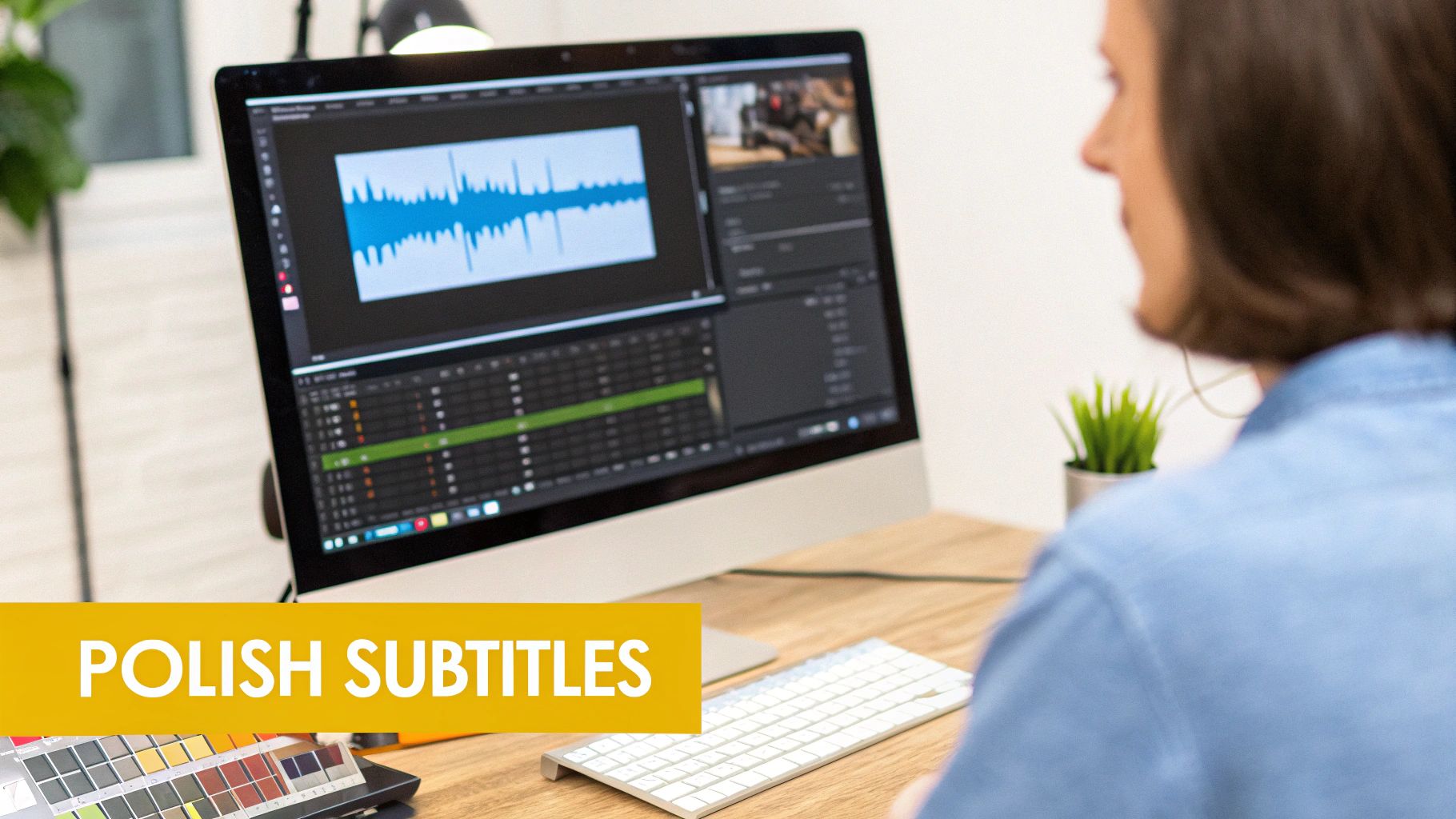
Getting an AI-generated translation is a fantastic head start, but the real magic happens in the editing suite. This is where you elevate a decent first draft into a polished, engaging, and perfectly timed final cut. The TranslateMom Studio Workspace is built for this exact job, giving you fine-grained control over every piece of your Lao to English translation.
The initial AI pass does the heavy lifting, no doubt. But a quick human review is what catches those tricky cultural nuances and ensures the dialogue feels natural in English. You'd be surprised how a few small tweaks can completely change how an audience connects with your content.
Navigating the Subtitle Editor for Precision
The heart of this whole process is the Subtitle Editor. Every line of your translated text is laid out right there for you to review and adjust. Just click on any line to edit it on the fly—the video player even pauses automatically so you can focus on getting the words perfect.
For a side-by-side comparison, you can toggle on the Split View. This feature is a lifesaver. It shows your original Lao text right next to your new English translation, making it easy to cross-reference and make sure the core meaning is still intact.
But great subtitles are more than just accurate words; they need spot-on timing. This is where the visual audio Waveform becomes your best friend.
- Visual Timing: Forget guessing timestamps. You can actually see the peaks and valleys of the speaker's voice.
- Drag-and-Drop Syncing: To sync your subtitles, just drag the start and end points of a caption block to line up perfectly with the audio. Text appears the moment someone starts speaking and vanishes during pauses.
This visual approach to timing is a complete game-changer. It takes all the tedious guesswork out of the equation and lets you create a viewing experience that feels professional and seamless, keeping your audience hooked.
Customizing the Look and Feel of Your Captions
Once your text and timing are locked in, you can get creative with the aesthetics. How your subtitles look is just as crucial as what they say, especially on visually competitive platforms like TikTok and Instagram. The Style tab is where you can customize every visual detail.
Here, you can fine-tune things like:
- Font: Pick a font family and size that aligns with your brand's vibe.
- Colour: Tweak the text colour, outlines, and shadows to ensure your subtitles are super readable against any video background.
- Background: Add a semi-transparent background box to your captions to really make them pop.
This level of control means your subtitles aren't just an afterthought—they're an integral part of your video's design. If you want to dive deeper into the technical side of things, our article on closed captions vs subtitles has some great info.
Creating Engaging Karaoke-Style Animations
Want to make your content truly stand out, particularly in short-form videos? Try adding dynamic "Karaoke" style animations. It's that popular effect where words are highlighted as they're spoken, instantly grabbing the viewer's attention and boosting engagement.
Head over to the Style tab in TranslateMom, and you'll find various animation presets to choose from. The app automatically tracks word timings, so the highlighting stays perfectly synced with the audio. It's a simple touch that adds a layer of professional polish, can seriously elevate your video's impact, and helps you translate Lao to English in a way that’s visually compelling.
Advanced Features and Exporting Your Translated Video
Once your Lao to English subtitles are perfectly timed and styled, it's time to add that final layer of polish. A few advanced features can take your video from good to great, making it clearer, more engaging, and ready for any platform you throw at it.
Beyond just fixing typos, modern tools give you some serious creative control. Inside the TranslateMom Studio, the AI tab is your best friend for smoothing out any awkward phrasing. Let's be real, a direct Lao-to-English translation can sometimes sound a bit stiff. The AI can help rewrite or summarize captions to capture the original vibe with a more natural, conversational English flow.
Engaging Language Learners with Dual Language Mode
If you're creating educational content, you're going to love this. The Dual Language Mode is a game-changer. Flick it on, and it displays both the original Lao and the translated English subtitles on the screen at the same time, stacked on top of each other.
This is an incredible tool for anyone learning either language. Viewers can directly compare Lao and English in real-time, connecting words and sentence structures on the spot. It's a simple feature that massively boosts the learning experience.
This bilingual display instantly transforms your video from a piece of content into a dynamic educational resource. It's a brilliant way to serve a broader audience that's actively trying to learn Lao or English.
Finalizing and Exporting Your Project
When everything looks perfect, you’ve got two main ways to get your work out into the world. Which one you choose really just depends on where your video is headed.
The first option is to burn-in the subtitles. This creates a brand-new video file where your styled English captions, animations, and even your logo (via the Brand tab) are permanently "baked" into the picture. This is the way to go for platforms like TikTok, Instagram, or X (formerly Twitter). It guarantees that everyone sees your subtitles, no matter what device or settings they're using.
If you're thinking about adding a voiceover to your content, knowing how to do a voiceover is a skill that pairs perfectly with high-quality subtitles.
On the other hand, you might just need the subtitle file itself to use in professional editing software like Premiere Pro or Final Cut. No problem. You can simply download the subtitles in a few standard formats:
- SRT: This is the most common format out there. It's the industry workhorse.
- VTT: A more modern format you'll often see used for web video players.
- TXT: A simple, clean text file of your entire transcript.
This flexibility means your translated project is ready for any workflow you can imagine. And if you're ever starting with just a raw script, learning about a converter for TXT to SRT files can save you a ton of time.
Common Questions About Lao to English Video Translation
Diving into video translation can feel a bit overwhelming, especially with a language as nuanced as Lao. You've probably got some questions. Let's tackle the big ones creators usually ask when translating their Lao videos for an English-speaking audience.
How Accurate Is AI for Translating Lao to English?
This is the number one question I get. Modern AI is surprisingly good, often hitting over 90% accuracy on the first pass when going from Lao to English. But, and this is a big but, it's not perfect.
AI can easily miss the mark on cultural slang, regional dialects, or those inside jokes that are crystal clear to a human. The machine just doesn't have that context.
I always tell people to think of the AI translation as a really solid first draft. From there, you jump into a tool like TranslateMom's "Studio" editor to do a final polish. This mix of AI speed and a quick human review gives you the best of both worlds: fast results that actually sound natural.
What Is the Best Subtitle Format for Social Media?
It really depends on where you're posting.
For big platforms like YouTube or Facebook, you can't go wrong with the SRT (.srt) format. It’s the industry standard for a reason—it’s just a simple text file that works everywhere. It's your safest bet for maximum compatibility.
But for short, punchy clips on TikTok, Instagram Reels, or X (formerly Twitter), you’ll want to "burn in" the captions. This means the text becomes a permanent, unmissable part of the video itself. Using the Export Video function in TranslateMom does this for you, so your perfectly styled and animated subtitles show up for every single person, no matter what their app settings are.
Can I Translate the Lao Audio into English Speech?
Absolutely. This is what we call AI dubbing, and it's a game-changer.
Powerful tools like TranslateMom can create a whole new English audio track that matches the timing of your original Lao video. The AI listens to the Lao speech, translates it, and then generates a synthetic English voice to speak the lines.
It’s an amazing option for reaching viewers who'd rather listen than read. This one feature can massively boost your content's accessibility and reach. Just pick the Dubbing service when you're starting your project.
Is It Hard to Sync Subtitles with the Video Timeline?
It used to be a nightmare, honestly. You'd be messing with timestamps for hours, trying to get things just right. Thankfully, those days are over. Today, it’s all visual.
Inside an editor like the one in TranslateMom, you see the audio waveform—all the peaks and valleys of the sound. You literally just drag the subtitle blocks and line them up with where someone starts and stops talking. It’s way faster and much more precise than trying to guess with timestamps.
Ready to get your Lao content in front of a global audience? With TranslateMom, you can subtitle, translate, and even dub your videos in just a few minutes. Start your free project today and see for yourself how simple it is to break through language barriers.