TranslateMom - Translate Youtube Videos, Get Captions, Subtitles & Accurate Video Translation and Transcription

Guide · November 3, 2025

How to Translate YouTube Videos and Go Global

Translating your YouTube videos is the growth lever that unlocks global reach, stronger SEO and longer watch time.

Why Translating Your YouTube Videos Is a Game Changer

A person pointing at a world map, symbolizing global audience reach for YouTube videos.

Translating your YouTube videos isn't just a "nice to have"—it's a massive growth lever. Think of it as opening the door to a global audience, giving your SEO a serious kick in new languages, and ultimately getting more people to watch your content for longer. This comes down to creating subtitles or dubbing your audio into different languages so your videos are understandable for anyone, anywhere.

Let's be clear: thinking about how to translate YouTube videos goes way beyond just slapping some text on the screen. It's a core growth strategy. If your content is only in one language, you’re basically closing the door on a huge chunk of YouTube's audience. This isn't just about chasing view counts; it’s about building a real, international community around what you do.

The real win comes from the strategic advantages. When you offer multilingual options, you're making the viewing experience better for international viewers. YouTube's algorithm loves that, and it rewards you with more visibility.

Expand Your Reach and Boost Engagement

Here’s a real-world example. Imagine you run a DIY channel in English out of Vancouver. Just by adding French subtitles, you could instantly tap into millions of potential viewers in Quebec and other French-speaking communities across the country. That simple act makes your content feel like it was made just for them, which naturally leads to more likes, comments and shares.

This becomes even more powerful in culturally diverse cities. A food vlogger in Toronto could add dubs in Spanish and Punjabi to connect with the city's massive communities. Suddenly, you're not just some random channel; you're creating a loyal local following that feels seen and respected. That’s how you turn casual viewers into die-hard subscribers.

Tools such as TranslateMom can spin up those multilingual subtitles and dubs in minutes so you can focus on programming the next upload.

Unlocking SEO and Revenue Potential

One of the biggest—and most often missed—benefits of video translation is how it supercharges your SEO. When you translate your video's title, description and subtitles, you're creating brand-new ways for people to find you. Your video can suddenly start ranking for search terms in Spanish, French or German, showing up for an audience that would have never found you otherwise.

This bigger audience has a direct line to your revenue, too. A lot of high-CPM (cost per mille) countries are non-English speaking. By making your content accessible in places like Germany or France, you can seriously boost your potential ad earnings. You're no longer fighting for attention in the crowded English-speaking market; you're setting up shop in less competitive, high-value ones.

Translating your content is an investment in discoverability. Every new language you add acts like a new net cast into the vast ocean of YouTube, catching viewers you would have otherwise missed entirely.

You can see the demand for this everywhere, especially in multicultural countries. In Canada, the 2021 census found that a record 4.6 million Canadians mostly speak a language other than English or French at home. For creators, this is a massive, untapped opportunity to connect with huge domestic audiences just by investing in translation.

Video Translation Methods at a Glance

Feeling a bit overwhelmed by the options? This comparison table gives you a quick snapshot of the three core translation methods. Use it to pick the right approach based on your budget, timeline and how much control you want over the final quality.

Method Best For Cost Time Investment Quality Control
YouTube's Native Tools Creators on a budget; simple subtitle needs. Free Low to Medium Relies on auto-captions and community contributions; quality can vary.
Manual SRT Workflow Perfectionists who need 100% accuracy; professional localization. Varies (DIY is free, hiring pros costs more) High Complete control; quality is as good as your translation.
AI-Powered Tools Speed and scale; creators who need subtitles & dubbing quickly. Subscription-based (e.g., TranslateMom) Low High initial accuracy, but requires a final human review for nuance.

Get to Grips with YouTube's Own Translation Tools

You don't need fancy software or a big budget to start translating your videos. The most straightforward way to begin is inside your YouTube Studio dashboard. YouTube has a surprisingly decent set of built-in tools that can get you moving quickly.

Think of these native features as your first port of call. They're already integrated into your workflow, letting you manage subtitles for all your videos in one place. While they aren't as powerful as dedicated AI platforms, they offer a solid starting point for any creator serious about reaching a global audience.

Start with Auto-Captions

The easiest way in is with YouTube's automatic captions. After you upload a video, YouTube's speech recognition tech gets to work transcribing the audio and creating a time-coded caption file. This isn't just for accessibility; it’s the raw material for all your future translations.

But you can't just set it and forget it. Auto-captions often mess up:

  • Brand names and acronyms. The system might hear "TranslateMom" and spit out "trans late mom."
  • Technical jargon. Niche terms can get transcribed into something completely bizarre.
  • Proper nouns. Names of people, places or products are frequently misspelled.

Treat the auto-caption file as a rough first draft. Before you translate anything, scrub every single error. A clean, accurate transcript is absolutely non-negotiable if you want quality translations.

You can find the Subtitles panel in your YouTube Studio to manage all of this. The editor lets you tweak text and timing for each line, making sure your corrected subtitles sync perfectly with what you're saying.

Use Auto-Translate for Quick Wins

Once you have a perfect caption file in your original language, you can tap into YouTube's auto-translate feature. This tool takes your corrected captions and runs them through Google Translate, generating subtitles in dozens of other languages. In just a few clicks, you can add Spanish, French, Hindi and more to your video.

It’s an incredibly fast way to make your content accessible worldwide. The catch? The quality is entirely dependent on machine translation. For many languages, it's good enough to get the main idea across, but it will lack nuance, cultural context and perfect grammar.

Auto-translate is great for testing the waters in new markets, but it's no replacement for a professional job. Use it for basic accessibility and audience discovery, but don't expect a polished finish without human review.

Don't Forget to Translate Titles and Descriptions

Subtitles make your video understandable, but a translated title and description are what convince international viewers to click in the first place. It’s one of the biggest SEO wins you can activate.

In the same Subtitles section of YouTube Studio, add translations for your metadata. Don't just paste your English title into a translator. Think about what a viewer in France or Brazil would actually search for and use localized keywords to maximize discoverability.

Go the Extra Mile with Multi-Language Audio Tracks

For creators who really want to level up, YouTube now supports multi-language audio tracks. This lets you upload separate dubbed audio files for different languages. When someone from a supported region watches your video, YouTube can automatically play the audio in their native language.

  1. Produce a dubbed audio file by hiring a voice actor or using an AI dubbing service.
  2. Head to the Subtitles editor for your video in YouTube Studio and add the target language.
  3. Upload your new audio file in the language's Audio column to localize the viewing experience.

This single feature can transform your channel from being simply "translated" to truly "localized." It’s perfect for audiences who prefer listening over reading, and it can dramatically boost engagement and watch time in new countries.

The Professional Workflow for Perfect Manual Subtitles

When you absolutely cannot compromise on quality, the manual workflow is still king. YouTube's built-in tools are handy and AI is getting incredibly fast, but nothing beats the granular control you get from creating a subtitle file by hand.

This approach guarantees every word, every intentional pause and every bit of cultural nuance is captured perfectly. It's the path for creators who need their brand messaging, technical guides or artistic vision to land flawlessly, no matter the language. It’s more involved, but it puts you in complete control.

Getting a Flawless Transcript

Before you translate anything, you need a perfect, word-for-word transcript of your video's original audio. Any mistake here will ripple through every language you create, so getting it right from the start is crucial.

  • Do it yourself. Open a text editor, play the video, pause, type and rewind. It's time-consuming, but you catch every subtle detail.
  • Use a transcription service. For longer videos or tight deadlines, professional services like Rev or Scribie deliver accurate, time-coded transcripts for a fee.

Understanding the SRT File

With your transcript ready, the next task is to format it into an SRT (SubRip Subtitle) file. Think of it as a simple text file that tells video players what text to show on screen and exactly when to display it. It’s the universal standard, and YouTube loves it.

The structure repeats: a sequence number, a timestamp formatted as hours:minutes:seconds,milliseconds --> hours:minutes:seconds,milliseconds, the subtitle text and a blank line. Typing timestamps by hand is tedious, which is why subtitle editing software is worth it.

Using Subtitle Editing Tools

Subtitle editors make the process visual and intuitive. Instead of guessing timestamps, you watch your video and mark the start and end points for each line of dialogue on a timeline. Many tools include audio waveforms so you can see exactly where words are spoken.

Screenshot of the Aegisub subtitle editor interface.

Powerful, free, open-source options like Aegisub give you this professional-grade interface. User-friendly web tools like Kapwing are also great. For creators seeking a balance between AI efficiency and manual precision, platforms like TranslateMom can bridge the gap.

Mastering the Art of Subtitling

Great subtitles are about more than accurate words—pacing and readability matter. If your subtitles are distracting or timed poorly, they can pull the viewer out of the experience.

  • Character limits. Keep each line under 42 characters so the text is easy to scan.
  • Smart line breaks. Avoid breaking a sentence mid-thought; keep phrases on the same line for natural reading.
  • Dialed-in timing. Display subtitles as the speaker starts and remove them right after they finish talking.

The best subtitles are the ones you forget you're even reading. They should feel seamless, supporting the video instead of distracting from it.

Using AI for Rapid Subtitles and Voice Dubbing

Manual workflows deliver total control, but they take serious time. AI-powered platforms can change the game for creators who need to translate YouTube videos without a big team. These tools can compress days of work into minutes by bundling transcription, translation and even voice synthesis into one workflow.

TranslateMom is built specifically for rapid, high-quality localization. A single creator can manage the entire process from a browser, breaking down language barriers without the usual headaches.

The Modern AI Translation Workflow

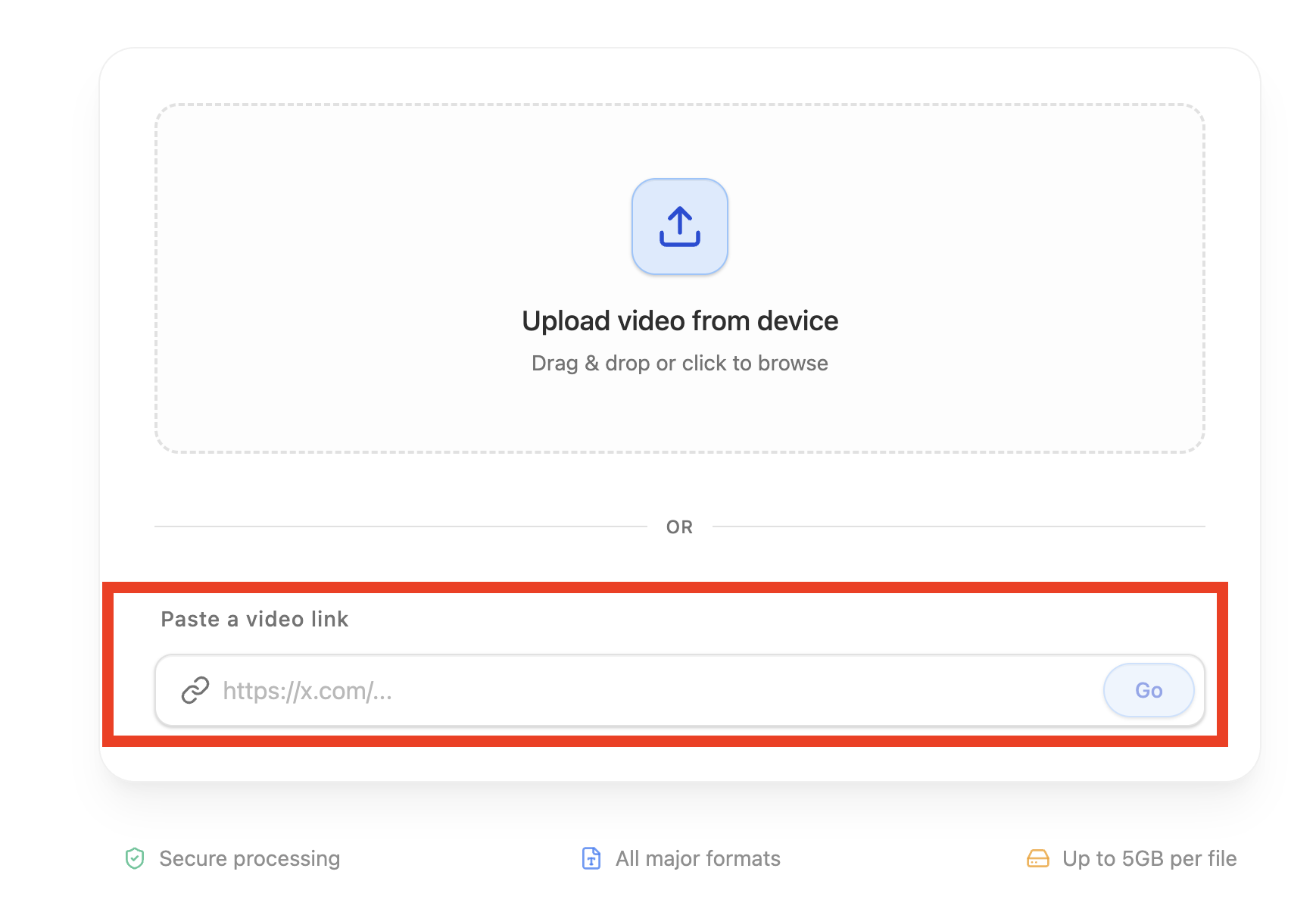
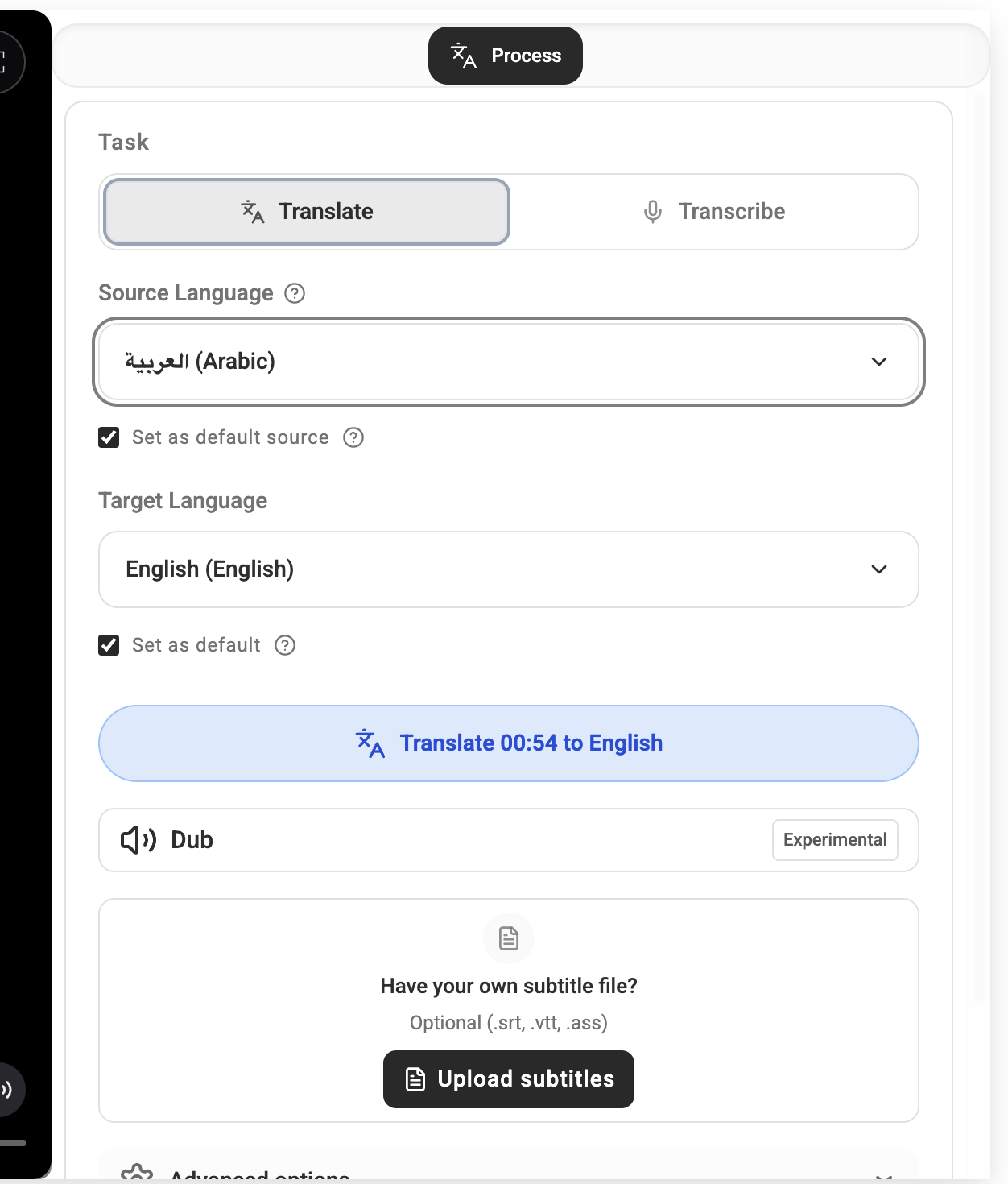
Start by uploading your video file or pasting a YouTube URL. AI immediately transcribes every word with solid accuracy. Choose the languages you want to target and the platform generates perfectly timed subtitle files—SRT, VTT and more—ready to publish.

The real magic is in the dubbing feature. Using advanced voice synthesis, these platforms can generate a full audio track in another language, often with multiple voice options so you can match your original tone and style.

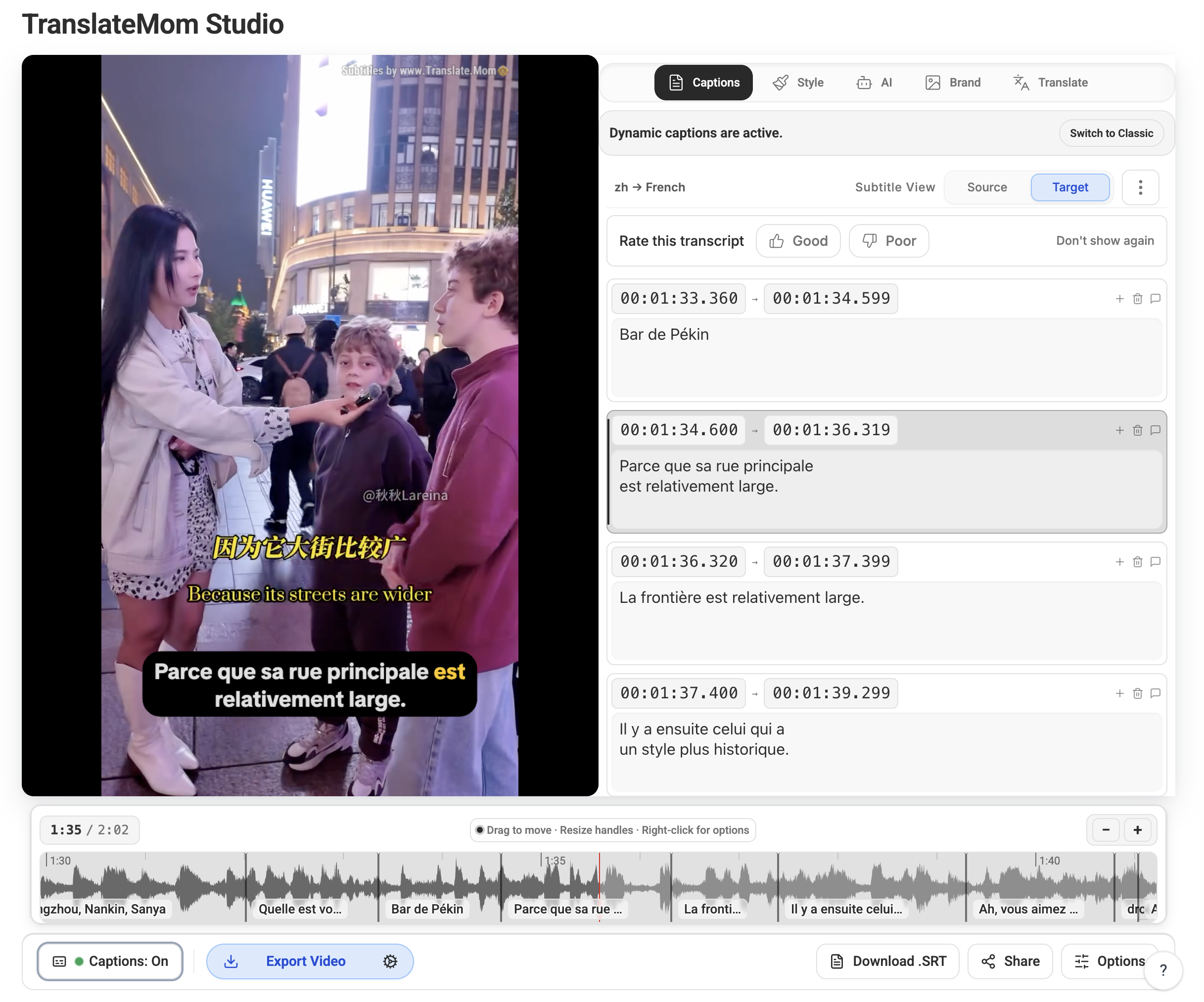
Screenshot of the TranslateMom interface showing subtitle and dubbing tools.

The clean layout makes it easy to upload a video, pick your languages and manage both subtitles and dubbed audio tracks without getting lost in menus.

The Critical Human Review Stage

AI is blazing fast, but it's not a set-it-and-forget-it solution. The most important step is the human review that adds the finishing polish.

  • Emotional tone. Make sure the AI voice matches the energy of your original delivery.
  • Pronunciation. Double-check that unique brand names, jargon and acronyms sound right.
  • Cultural nuance. Tweak idioms or phrases so they feel natural to native speakers.

AI gets you 95% of the way there in a fraction of the time. Your final review is the last 5% that makes the translation feel human.

The Growing Importance of Dubbing

Subtitles are critical, but dubbed audio is rapidly becoming the gold standard for international reach. YouTube has been expanding multi-language dubbing features, and early adopters report that roughly 25% of their watch time now comes from viewers listening to dubbed audio tracks.

This trend shows audiences want a native-feeling experience. When viewers can engage without reading, they watch longer and share more. If you're ready to dig deeper into YouTube's dubbing push, read Air.io's breakdown on multi-language audio adoption trends.

Getting Your Translated Content Discovered

Translation is a huge win, but the work isn't done once you export an SRT file. The final piece of the puzzle is making sure your localized content is discoverable in every market you target.

Don't Just Translate—Localize Your Metadata

Your video's title and description are SEO goldmines. Direct translations rarely capture how viewers actually search. Instead, do localized keyword research to find the phrases people use in your target countries and tailor your metadata accordingly.

For example, "Easy Sourdough Bread Recipe" might perform better in French Canada as "Recette facile de pain au levain." Once you've nailed the localized version, add it inside YouTube Studio so every audience sees language-specific copy that resonates.

How to Upload Your Translated Files

  1. Open the video inside YouTube Studio → Subtitles.
  2. Click Add Language and pick the translated language.
  3. Select Add in the Subtitles column, upload your SRT or VTT and publish.
  4. If you have dubbed audio, upload it from the Audio column for that language.

The goal is to make your video feel like it was made for each market. Localized metadata and assets build trust and boost discoverability.

Smart Ways to Promote to International Viewers

Don't rely on algorithms alone. Create language-specific playlists—think "Vidéos en Français"—so viewers can binge everything in their language. Promote new translations on social platforms, use geographic ad targeting and engage with your global community via YouTube's Community tab.

Prioritize languages strategically. For Canadian creators, French is a must since it's spoken by about 22% of the population. Languages like Spanish, German and Portuguese often offer a strong balance of large audiences and high CPMs; dive into BeMultilingual's CPM analysis to pick the next language on your roadmap.

Got Questions About Translating YouTube Videos?

Taking the leap into video translation can feel intimidating. These answers cover the biggest questions creators ask when they start thinking about going global.

Subtitles or Dubbing: Which One's Better?

There’s no single right answer. Let your content and audience guide the decision.

  • Subtitles shine for how-to guides, tutorials and technical content. They're fast, inexpensive and keep terminology precise.
  • Dubbing delivers an immersive experience for vlogs, documentaries and storytelling content. Viewers can relax and watch without reading.

Start with subtitles in a few key languages, watch your analytics and invest in dubbing once you see clear demand.

How Much Is This Going to Cost Me?

Translation costs can range from zero to hundreds of dollars depending on the workflow. Here's a snapshot for a 10-minute video:

Method Estimated Cost Bottom Line
DIY with YouTube Tools $0 Costs nothing but time; quality depends on your fluency and attention to detail.
Hiring a Freelancer $50 – $150+ Rates vary widely based on language pair and translator expertise.
AI Translation Platform $10 – $40 Platforms like TranslateMom balance speed, affordability and high accuracy—perfect for scaling your back catalog.

Will Translating My Videos Actually Get Me More Views?

Absolutely—but not just from existing subscribers. Translated titles, descriptions and subtitles unlock SEO pathways you couldn't reach before, letting new viewers discover your videos in their native language.

Think beyond accessibility. Translation is a discoverability engine that exposes your content to entirely new markets.

What Are the Easiest Languages to Start With?

Be strategic instead of trying to translate into every language. For most English-speaking creators, especially in Canada, these are smart first picks:

  1. Spanish — Over 500 million speakers worldwide make it a huge opportunity.
  2. French — Unlocks Quebec, France and parts of Africa with one localization.
  3. Portuguese — A direct line to Brazil's massive and engaged YouTube audience.
  4. German — Reaches a large, high-income audience with strong CPM potential.

Launch subtitles in one or two languages, monitor YouTube Analytics and let performance guide your next round of investment.

Ready to Translate Your Next Video?

Ready to stop letting language barriers limit your channel's growth? TranslateMom gives you the AI-powered tools you need for fast, accurate subtitles and natural-sounding dubbing. Connect with a global audience today at translate.mom.