Translating your content from Arabic to Urdu isn't just a technical task—it's a massive opportunity to connect with huge, overlapping communities. For creators, this is about reaching millions of people who might read the Arabic script but truly live and breathe in Urdu. It’s a crucial step for anyone serious about growing their audience, especially within large diaspora groups.
Why Arabic To Urdu Translation Unlocks New Audiences
The link between Arabic and Urdu runs deep, sharing history, religious context, and the same script. But let's be clear: they are completely different languages.
Many Urdu speakers learn to read Arabic for religious purposes, but their everyday comprehension and conversation happen in Urdu. Translating your content shows you get that difference. It makes your message land exactly as you intended, without the friction of a language barrier.
Tapping Into Growing Global Communities
This isn't just theory; it has real-world impact, particularly in countries with large South Asian populations. Take Canada, for example. The Urdu-speaking community there is exploding.
Census data from a regional analysis showed Urdu was one of the fastest-growing mother tongues, jumping by over 60% in just a decade to almost a quarter-million speakers. That’s a massive, engaged audience just waiting for content they can connect with.
This is where the opportunity really opens up for creators. By taking your Arabic video content and converting it to Urdu, you’re speaking directly to these flourishing communities.
Tapping into the Arabic to Urdu language pair isn't just about translation—it's about cultural resonance. You're meeting a massive audience in the language they think, feel, and dream in, leading to deeper engagement and loyalty.
Beyond Words: A Cultural Bridge
When you translate your videos, you're ensuring your message isn't just understood on a surface level—it's actually felt. The benefits are immediate and powerful:
- Deeper Engagement: Viewers who are comfortable with Urdu will stick around longer and connect more deeply with content in their native language.
- Broader Reach: You instantly throw the doors open to millions of Urdu speakers who might not be fluent enough in Arabic to get the full picture.
- Improved Accessibility: Localization breaks down barriers, making your educational, religious, or entertainment content available to a much wider audience.
At the end of the day, offering an Urdu version of your Arabic content is a sign of respect. It tells your audience you value them enough to meet them where they are. This is how you build a loyal following that sticks with you for the long haul. You can find out more about the tools that make this possible in our post on the power of an effective AI video translator.
Preparing Your Video for a Flawless Translation
A great Arabic-to-Urdu translation doesn't just happen in the editing suite; it starts with a solid foundation—your source video. Taking a few moments to prepare your original file makes a world of difference in the final quality of your Urdu subtitles and dubbing.
The most critical factor? Clean audio. AI transcription tools are incredibly smart, but they get tripped up by background noise, loud music, or overlapping speakers. For the best outcome, make sure the speaker's voice is front and centre. If you're creating new content, something as simple as using a good microphone in a quiet room will save you from a ton of headaches later on.
Setting the Right Foundation
Before you even think about uploading your video, you need to consider the specific Arabic dialect being spoken. Arabic isn't one monolithic language. A video in Modern Standard Arabic (MSA) is a completely different beast from one in a regional dialect like Egyptian or Levantine.
Getting this right from the get-go is vital. When you select the correct source dialect for your project, you're giving the AI the proper context it needs. This single choice dramatically boosts the accuracy of both the initial transcription and the final translation into Urdu.
For example, when you start a New Task in a tool like TranslateMom, you'll upload your video or paste a link from a site like YouTube. The next screen will show you a Source Language dropdown. This is where the magic happens.
- Be Specific: Don't just pick "Arabic." If you know the dialect, choose it (e.g., "Arabic - Egypt").
- Default to MSA: When in doubt, or if the speaker is using formal language, "Arabic (Modern Standard)" is usually your safest bet.
Think of it this way: getting the source dialect right is like giving your GPS the correct starting address. If you mess that up, the whole journey is off, and you'll end up with a translation that might be technically right but feels completely wrong to a native speaker.
The Power of a Good Transcript
If you're aiming for the highest possible accuracy, creating and cleaning up an Arabic transcript before you translate is the way to go. While most tools can generate one for you automatically, taking the time to review it ensures the AI is working from a perfect source.
This is your chance to correct any names, specialized jargon, or tricky phrases that an AI might otherwise misunderstand. Once you have that polished Arabic text, your arabic to urdu translation will be far more reliable.
Inside the TranslateMom Studio, you can edit the source text directly in the subtitle editor before you even hit the translate button. This gives you complete control and ensures your Urdu-speaking audience gets a clear, accurate, and professional final product.
How To Generate Accurate Urdu Subtitles
Alright, so you’ve got your prepped Arabic video and you’re ready to get those Urdu subtitles just right. It's actually a pretty straightforward process, especially when you have a tool that keeps everything in one place. Using something like TranslateMom means you can go from upload to final export without ever leaving your browser.
First things first: getting your media into the system. The flowchart below gives you a bird's-eye view of what needs to happen before you even think about translation. It all comes down to clean audio and a solid transcript.
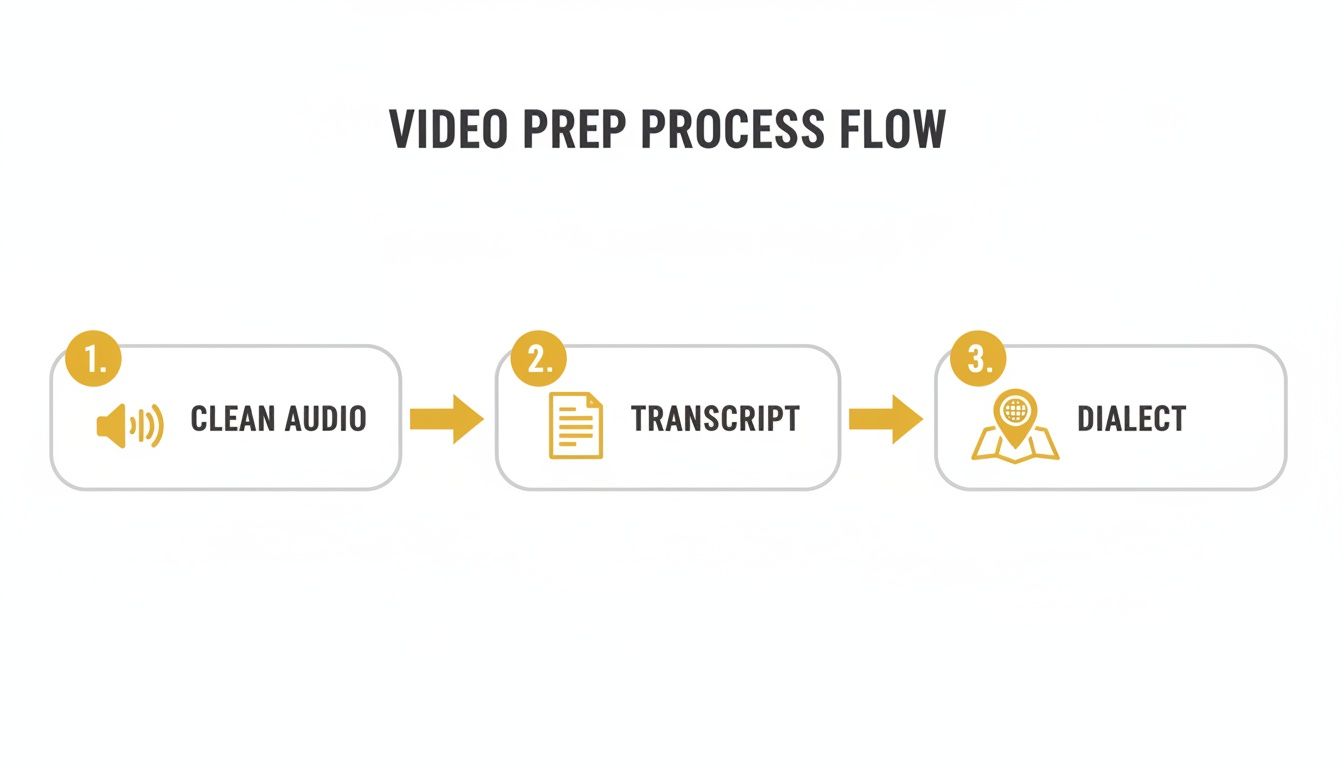
As you can see, the work you put in upfront really pays off later. Good prep work is the foundation for high-quality Urdu subtitles.
Initiating Your Translation Task
Let's kick things off. In TranslateMom, this all starts on the New Task screen. You've got a couple of easy ways to get your video in:
- File Upload: Just drag and drop the Arabic video file from your computer straight into the app.
- Link Import: Grab a URL from YouTube or TikTok, paste it in, and the platform will pull the video for you.
Once it's loaded, you'll tell the app what to do. For our Arabic to Urdu project, you’ll set the Source Language to ‘Arabic’ and the Target Language to ‘Urdu’. Hit the Translation service option, and you're on your way. For even greater precision, especially if you're planning on AI dubbing later, using good AI speech-to-text technology to power the initial transcription is a game-changer.
Refining Subtitles in the Studio Editor
Now for the fun part—turning that initial machine translation into something polished and professional. The Studio Editor is where the magic happens. It’s built for fine-tuning, and my favourite feature for this kind of work is the Split View.
By flipping on Split View, you can see the original Arabic right next to the Urdu translation. This is absolutely critical. It lets you compare the nuance, double-check the context, and make sure you’re not just translating words, but meaning.
The visual waveform is your other best friend here. You can literally drag the start and end points of each subtitle to perfectly sync them with the speaker’s timing. No more subtitles that hang around too long or disappear too quickly.
Need to tweak the text? Just click on any Urdu subtitle line. The video automatically pauses, giving you a moment to rewrite a phrase so it sounds more natural to an Urdu-speaking audience.
This kind of detail is non-negotiable, especially for educational videos. The link between Arabic and Urdu script is incredibly strong. A fascinating study with Urdu-English bilinguals in Ontario found they scored 25% higher on Urdu reading tasks when they were familiar with Arabic script. It just goes to show how important precise, culturally aware translation is in video.
Ultimately, this hands-on editing is what separates an okay translation from a great one. You’re making sure your audience has a seamless, natural viewing experience. If you want to get even deeper into the nuts and bolts of captioning, check out our guide on the nuances of subtitling and translation.
Creating Professional AI Dubbing In Urdu
While subtitles are a fantastic first step, AI dubbing is what truly immerses your audience. When you create a full Urdu audio track for your Arabic video, it stops feeling like a translation and starts feeling like it was made just for them. It’s a completely different level of connection.This is where a tool like TranslateMom really shines. Once you’ve uploaded your Arabic video (or just pasted in the link), the process is pretty simple. You’ll choose your source and target languages, but this time, you’ll select the Dubbing service. This tells the system to create a whole new audio track in Urdu, not just subtitles.
Reviewing And Refining The AI Voice
After the AI does its thing and generates the Urdu audio, it's time for you to step in. This is the quality control part, and it's about more than just checking for correct words. You're listening for the right tone, a natural rhythm, and cultural nuances. The goal is an audio track that sounds human, not like a computer reading a script.
A great place to start is by listening for how the AI handles words that are common to both Arabic and Urdu. There are a lot of them, but the pronunciation can be different. Does the AI say them the way an Urdu speaker would? It’s a small detail, but it’s something a native speaker will pick up on right away.
The most important thing to check for is emotional alignment. Does the AI voice’s tone—whether it's upbeat, serious, or neutral—actually match what’s happening in the video? A mismatch here can feel really strange and pull the viewer right out of the experience.
Don't be afraid to get hands-on with the script. Sometimes an AI will generate a sentence that's technically correct but just sounds a bit stiff or unnatural. Just pop into the Studio Editor, adjust the Urdu text to make it flow better, and regenerate the audio for that specific line. For both dubs and subtitles, it's incredibly helpful to use tools that can generate audio from text, as this helps you fine-tune the timing and verify everything sounds right.
Setting Realistic Expectations
It’s important to know what today's AI can do. The technology is amazing and getting better all the time, but it might not capture every tiny bit of emotion like a professional voice actor can. The objective here is to produce a final product that is clear, professional, and enjoyable to listen to.
Here’s a quick checklist I use when reviewing a dub:
- Pacing and Pauses: Does the timing of the Urdu audio line up with the speaker's actions and the natural pauses in the video?
- Clarity: Can you easily understand every word? Is it crisp and clear?
- Consistency: Does the voice sound like the same person from start to finish?
By going through these points, you can turn a good AI dub into a great one that sounds polished and professional. If you want more tips on voice localization, our guide on creating an English to Punjabi voice translation has some useful pointers too.
Styling And Branding Your Urdu Video Content
Getting the translation right is a huge win, but how it actually looks on screen can make or break the viewing experience. You've done the hard work, and a professional look ensures your message truly connects with your Urdu-speaking audience.
This is where you get to put the final polish on your content. Inside the TranslateMom Studio, you have full control over the visual style, turning a solid translation into a slick, branded video that people will want to watch.
Customizing Your Urdu Subtitles For Readability
First up, let's head over to the Style tab in the Studio's sidebar. This is your mission control for all the visuals. When you're translating from Arabic to Urdu, the font choice is a big deal. Urdu is almost always written in the beautiful, flowing Nasta'liq script, so picking a font that honours this style is crucial for both readability and cultural respect.
But it doesn't stop at the font. You can tweak everything else to perfection:
- Font Size and Colour: Make sure the text is easy to read on a phone screen. Pick colours that have a strong contrast against your video background so they don't get lost.
- Outline and Shadow: A subtle outline or a gentle drop shadow can make your text pop, especially over busy or changing backgrounds.
- Background Opacity: I often add a semi-transparent background box to my captions. It gives them a clean, professional look and makes them way easier to read without covering up too much of the video.
The best part? Every adjustment you make shows up instantly in the video player, so you can see exactly what you're getting in real time.
Creating Engaging Karaoke Effects
Let's be real: for short-form content on TikTok or Instagram, plain old static subtitles can feel a bit flat. This is where karaoke-style effects are an absolute game-changer.
Still in the Style tab, you can pick from animation presets that highlight words precisely as they’re spoken. This dynamic effect is a magnet for viewer attention on social media. It pulls their eyes along with the dialogue and really helps your key messages land. TranslateMom syncs the word timings for you automatically, but you can always jump in and fine-tune them for that perfect rhythm.
This feature turns passive watching into an active experience. By animating the Urdu text, you’re not just translating; you're guiding the viewer's focus and making your content stick. In a noisy social feed, that’s a massive advantage.
Protecting Your Work And Assisting Learners
Branding is your best friend for protecting your content and getting recognized. The Brand tab lets you upload your own logo or watermark. Just drag, drop, and resize it anywhere you want on the frame. It’s a super simple step that instantly adds a layer of professionalism and ownership.
And for anyone creating educational content, there's a killer feature you'll want to know about: Dual Language Mode. Flick this on, and you can display both the original Arabic and the translated Urdu subtitles on the screen at the same time. It's an incredible tool for language learners, letting them compare the two side-by-side to deepen their understanding. It’s a thoughtful touch that adds huge value for that niche audience.
Common Questions About Arabic To Urdu Translation
Even with a solid workflow, a few specific questions always pop up when translating from Arabic to Urdu. Let's get into some of the most common ones I hear from creators so you can move forward with confidence.
Can I Translate Directly Between Different Arabic Dialects and Urdu?
Absolutely, but this is a crucial step to get right. The dialect you choose as your source matters. A lot.
An AI model trained on Modern Standard Arabic (MSA) is going to give you a very different Urdu translation compared to one trained on, say, Egyptian or Levantine Arabic. For the most accurate results, you have to tell your tool which dialect is being spoken in the video.
If you're using a tool like TranslateMom, this is where you'll use the "Source Language" dropdown. Selecting the right regional variant gives the AI the context it needs, which makes a massive difference in the quality of the final Urdu output. If you're really not sure, MSA is usually a safe bet for more formal or news-style content.
What Is The Best Export Setting For YouTube vs. Instagram?
This really comes down to where your audience will be watching. Different platforms handle subtitles in different ways, so picking the right format is key to making sure your content looks professional everywhere it's posted.
Here’s a quick rundown of your main options in TranslateMom:
- Burn-in (Export Video): This creates a brand new video file where the Urdu subtitles are permanently part of the picture. This is what you want for platforms like Instagram, TikTok, or Twitter (X), where users don’t have an option to turn captions on or off themselves. It just works.
- Download Subtitles (SRT/VTT): This gives you a simple text file containing all your captions and their timings. It's the standard for platforms like YouTube or Vimeo. You just upload this file alongside your main video, and viewers can choose to enable or disable the captions as they wish.
Pro Tip: My advice? Do both. Export a burned-in version for your short social media clips and also download the SRT file for your primary YouTube upload. It’s a little extra step that covers all your bases.
How Do I Ensure My Translation Is Culturally Appropriate?
AI is fantastic for getting you 90% of the way there, but that last 10%—the cultural nuance—is where a human touch is non-negotiable.
You need to keep an eye out for idioms, religious terms, and any culturally specific references that just don't have a direct one-to-one translation. A common saying in Arabic could sound completely bizarre or even nonsensical if translated literally into Urdu.
This is exactly why the "Split View" in the Studio Editor is so useful. It lets you see the original Arabic right next to the generated Urdu translation. This side-by-side view makes it much easier for you or a native speaker to spot these subtleties and tweak the phrasing until it feels natural and resonates with an Urdu-speaking audience.
The demand for this kind of careful, culturally-aware translation is on the rise. In diverse places like California, for example, there's a unique market with around 150,000 Urdu speakers and 400,000 Arabic speakers. In that state alone, translation requests between the two languages have jumped by 30% since 2015. You can get more insights on this trend from Link Translations.
Ready to bridge the gap between your Arabic content and a massive new Urdu-speaking audience? With TranslateMom, you can subtitle, translate, and even dub your videos in minutes. Start your first project for free and see how easy it is to take your content global. Visit https://translate.mom to get started.