TranslateMom - Translate Youtube Videos, Get Captions, Subtitles & Accurate Video Translation and Transcription

Back December 6, 2025

A Practical Guide to AI Video Translator Technology

Discover how an AI video translator can unlock global audiences. This guide explains the technology and shows you how to translate video content step-by-step.

@MontaKaoh

17 min read

So, what's really going on inside an AI video translator? It's not one single piece of magic. Think of it more like a highly efficient, three-person team working in perfect sync to take your video global.

This team automatically handles the entire process—transcription, translation, and voice synthesis—letting you connect with audiences in different languages without the massive manual effort of traditional methods. Each member of the team has a specific job, and they hand off their work to the next person down the line.

Let's meet the team.

The First Step: Automatic Speech Recognition (ASR)

The first specialist on the team is the listener. This is the Automatic Speech Recognition (ASR) engine. Its sole focus is to listen intently to the audio in your video and convert every spoken word into a written text transcript.

But it doesn't just write down the words; it also creates precise timestamps marking exactly when each word or phrase is spoken. This transcript is the foundational blueprint for everything that follows. The better the audio quality, the more accurate this blueprint will be.

The Second Step: Machine Translation (MT)

Once the transcript is ready, it's passed to the second specialist: the linguist, or the Machine Translation (MT) engine. This is where the core language conversion happens.

Using sophisticated models trained on immense amounts of text from across the web, the MT engine translates the script from its original language (say, English) into the target language you've chosen (like Spanish or Japanese). These aren't clunky, word-for-word translations anymore. Modern MT can grasp context, grammar, and even some cultural nuances, producing a script that feels natural in the new language. For a look at how this ties into the broader world of AI-generated content, this article on how to make AI-generated video from scratch shares some interesting parallels.

The Third Step: Text-to-Speech (TTS) or Subtitle Generation

The final hand-off goes to the finisher, whose job depends on what you need.

If you want a dubbed video, a Text-to-Speech (TTS) engine takes the translated script and reads it aloud, creating a whole new audio track. In TranslateMom, this is the Dubbing service. Some of the more advanced tools even offer voice cloning, so the new audio sounds remarkably like the original speaker.

If you're aiming for subtitles, the system instead grabs the translated text and matches it to the timestamps created way back in step one. The result is a perfectly synchronized caption file, often in a standard format like SRT. (We actually have a great guide on how to convert a plain text file into a timed SRT file if you want to dive deeper into that.)

This quick overview shows how these core AI technologies work together to get the job done.

The Three Engines of AI Video Translation

A quick look at the core AI technologies powering modern video translators and the role each one plays in the process.

Technology Component Its Primary Job Practical Example
Automatic Speech Recognition (ASR) Converts spoken words into a timed text transcript. Listening to an English vlog and creating a text file of the dialogue.
Machine Translation (MT) Translates the text from the source to the target language. Taking the English transcript and converting it into Spanish text.
Text-to-Speech (TTS) Creates a synthetic voiceover from the translated text. Generating a natural-sounding Spanish voiceover from the translated script.

Each component builds on the last, creating a seamless flow from spoken audio in one language to a fully translated video in another.

A diagram illustrating the three-step AI language translation process: speech-to-text, translate, text-to-speech.

This automated, three-part workflow is what makes it possible to translate a video in minutes, not days. It's a game-changer, and it's catching on fast. Projections show North America holding about 41.2% of the global AI video translation market by 2025, largely because Canadian and U.S. creators are using these tools to reach diverse communities both at home and abroad.

Your First Translation: A Step-by-Step Walkthrough

Theory is one thing, but seeing an AI video translator in action is where it all clicks. Let’s walk through the entire process together, from uploading a raw video to exporting a perfectly translated final cut. We'll use a professional tool, TranslateMom, to show you how it's done.

This quick guide will show you just how easy it is to get started and how much creative control you have over the final product. The whole process breaks down into a few simple stages, so you’ll never feel lost.

Getting Your Video into The System

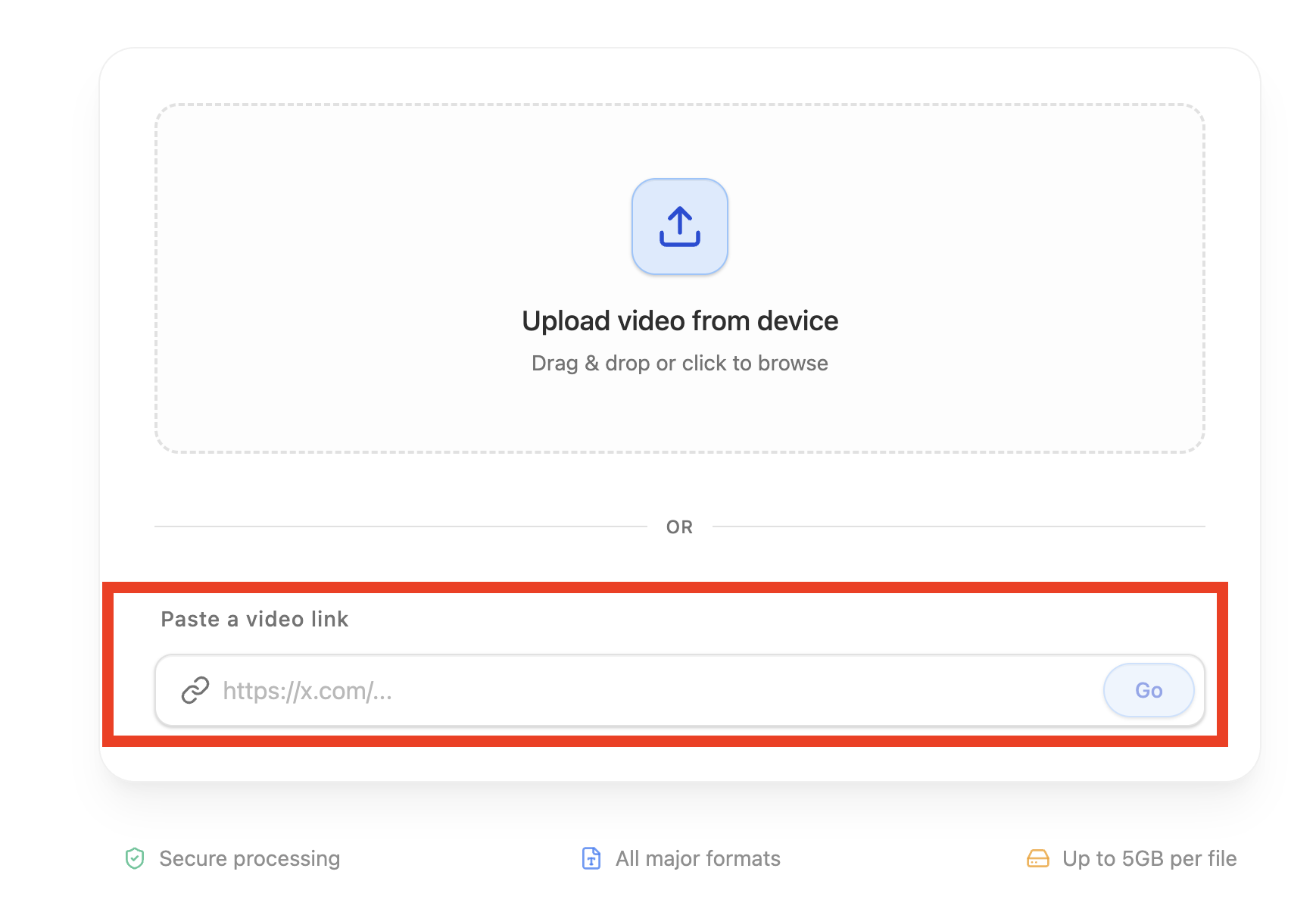
First things first, you need to get your video into the translator. Most modern platforms give you a couple of flexible options to get this done.

With a tool like TranslateMom, you handle this on the New Task screen. You have two main ways to go about it:

  • Direct File Upload: Just drag and drop your video file (up to 5GB) right into the browser. For an even quicker way, pressing F on your keyboard will pop open the file picker instantly.
  • Link Import: If your video is already live on the web, you can just paste in a URL from big platforms like YouTube, Twitter (X), or TikTok. The app will grab it and import it for you automatically.

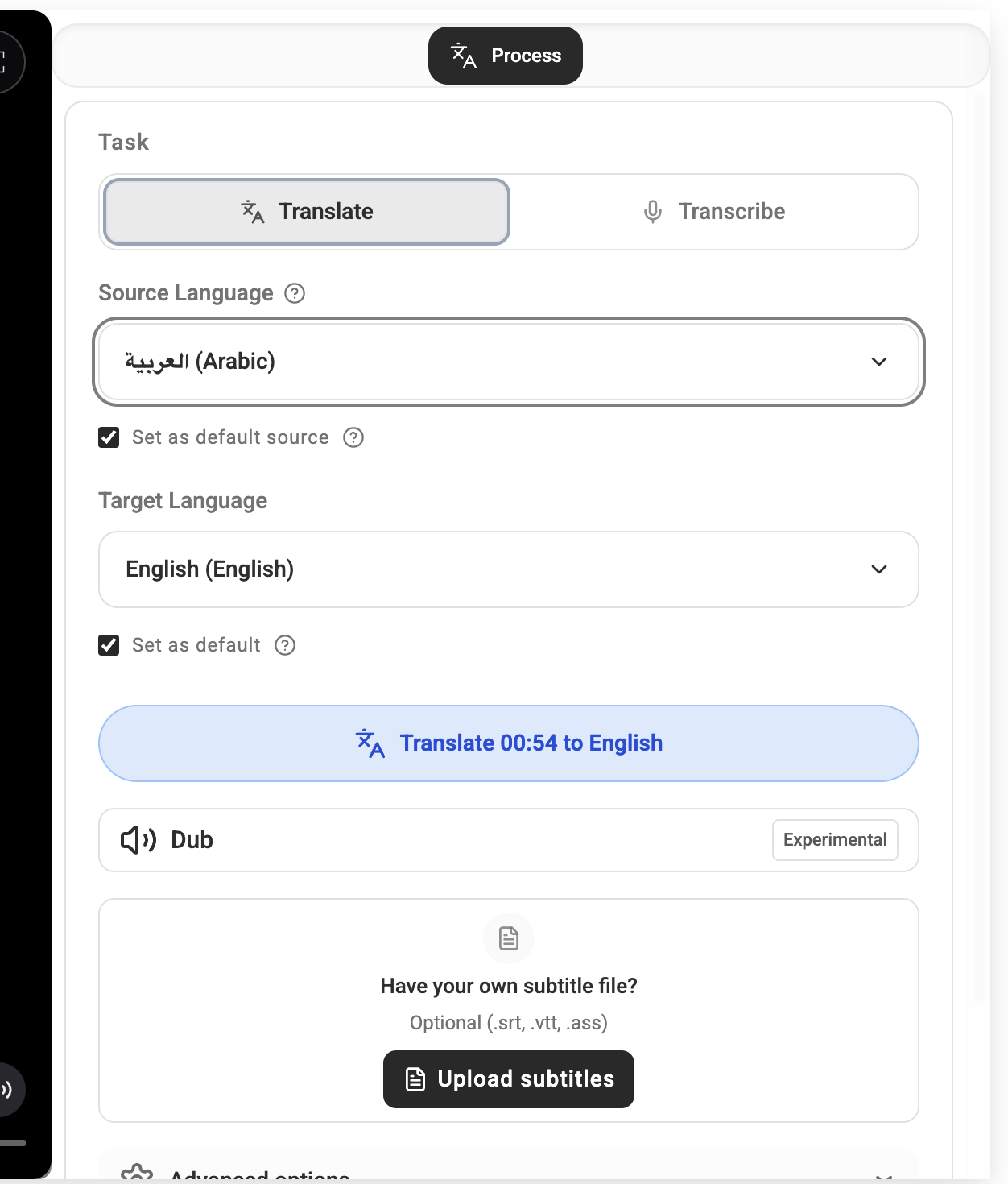
Once your video is uploaded, you’ll tell the system what you need. You'll pick the video’s original language (Source), the language you want to translate it into (Target), and the service you're looking for—whether that's a simple Transcription, Translation, or a full AI Dubbing.

Inside the Studio Editor

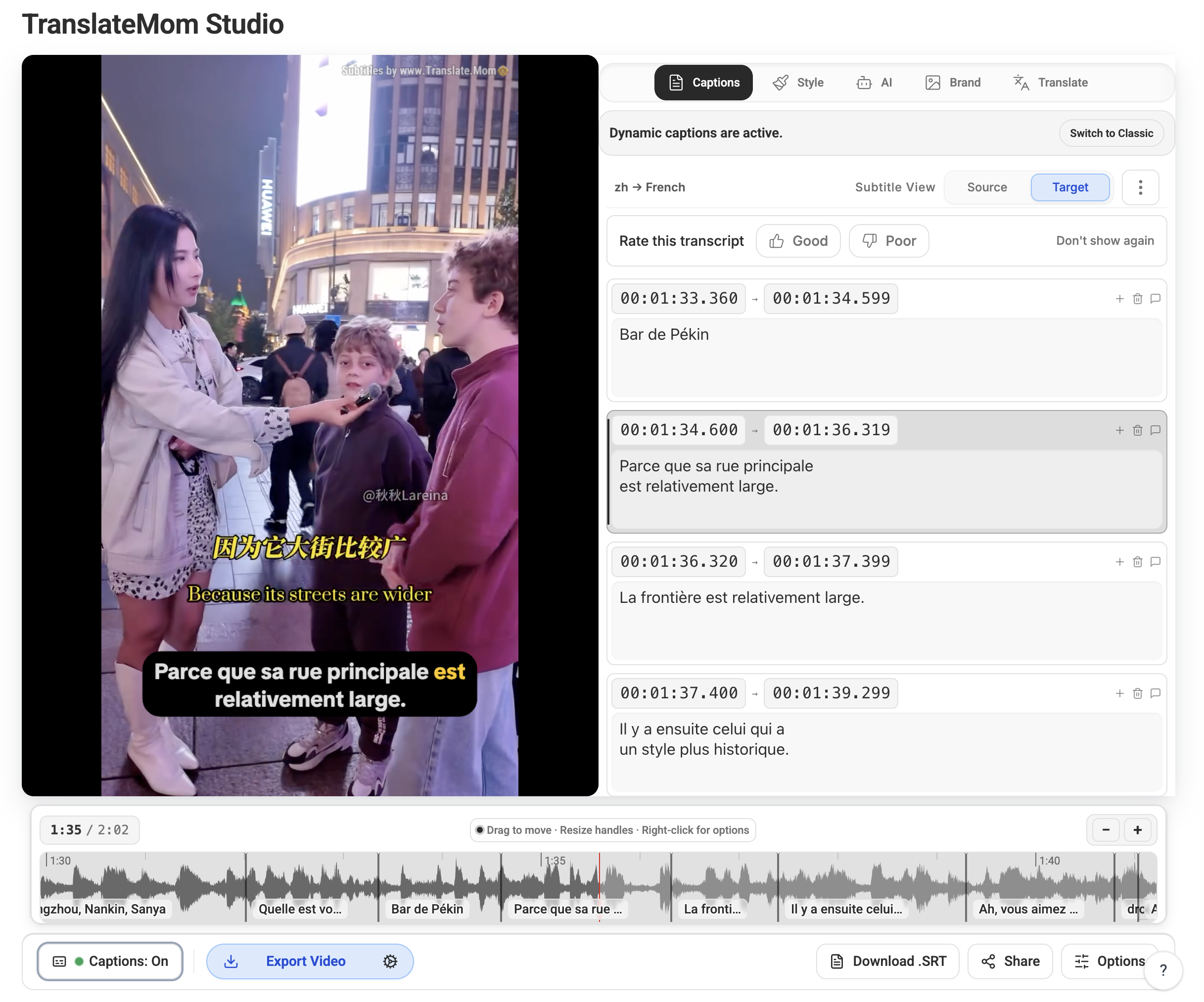
This is where the magic happens and where you get to polish the AI's work. The "Studio" is your main workspace where you can see and edit the video, audio, and text all at once. A good editor is what separates an okay result from a professional one.

Here’s what a typical editor looks like, with the video preview, subtitle timeline, and styling options all laid out for you.

Person working on a laptop displaying a waveform, using a mouse and keyboard at a desk.

The interface is built to be efficient, letting you see any changes you make in real-time.

The heart of the editor is the subtitle list. It shows every single line of dialogue with its start and end times. Clicking on any line lets you fix the text right away. To help you get the timing just right, you’ll see a visual audio waveform right below the text.

Pro Tip: Use the waveform to visually sync your subtitles with the audio. You can drag the start and end points of a caption to line up perfectly with when someone is speaking, which gets rid of those awkward pauses and makes for a much better viewing experience.

For translators, the Split View is a game-changer. This handy feature shows the original source text right next to your translation, making it super easy to compare them and make sure you're capturing the original meaning and tone. It’s a simple but powerful way to keep your translations accurate. For more in-depth tips, check out our complete guide on how to add subtitles to a video.

Finally, once you're happy with your edits, you can choose to either burn the subtitles permanently into the video or just download a standard SRT or VTT file to use with other software.

Choosing the Right AI Video Translator for Your Needs

Let's be real: not all AI video translator tools are built the same. With so many options popping up, it’s easy to get lost. But knowing what to look for will help you pick a platform that actually meets your creative and professional needs. The right tool doesn't just spit out a translation; it gives you the controls to create something polished and perfectly on-brand.

The absolute baseline is accuracy. If the initial transcription is full of mistakes or the translation completely misses the cultural nuance, the tool is pretty much useless. While no AI is perfect, a good one gives you a solid first draft that only needs minor tweaks, which saves a ton of time. And if you're dabbling in AI dubbing, the quality of those AI voices is everything—robotic, unnatural audio will send viewers clicking away in a heartbeat.

Essential Customization and Control

Once you've got accuracy covered, it's all about customization. Your subtitles need to match your brand's look and feel, and most importantly, they need to be easy for people to read. This is where a professional-grade editor really shines.

For example, a tool like TranslateMom gives you specific controls for the visual stuff:

  • The Style Tab: This is where you go beyond the boring default subtitles. You can tweak the font, size, and colour. You can even add an outline, a drop shadow, or a background to make sure the text pops against any kind of video footage.
  • The Brand Tab: To keep everything consistent, you can upload your own logo or watermark. The editor lets you resize it and drag it exactly where you want it on the screen.

These kinds of features are what make your translated content look professionally produced, not just like it was run through an automated script.

Person in headphones translating a video on a computer screen displaying 'STUDIO' and 'START TRANSLATING'.

Advanced Features for a Smoother Workflow

The best tools also pack in features that genuinely make your life easier and the final product better. Have you seen those "Karaoke-style" captions where words light up as they're spoken? They're super engaging for social media. In TranslateMom, you can enable these effects in the Style tab. The app handles all that tricky word-level timing for you, making a complex effect just a click away.

This is a big deal in markets with a huge appetite for localized content. Just look at Canada, where the language translation NLP market is on track to hit US$371.61 million in 2025. That growth is all about the need to connect with both English and French-speaking audiences. It really highlights why you need tools that can handle those subtleties and deliver top-notch results.

A key differentiator is the quality of the editor. A platform that offers a visual waveform, dual-language views, and keyboard shortcuts transforms video translation from a tedious task into an efficient creative process.

In the end, picking the right AI video translator is about finding that sweet spot between powerful automation and hands-on control. You want a platform that gets you 90% of the way there with accurate results, but also gives you the editing tools to polish, refine, and brand your content to perfection. If you're curious how different AI tools compare, check out our breakdown of AI models for content creation.

Putting Your Translated Videos to Work

So, how are people actually using this tech? An AI video translator isn't just a nifty tool; it's a bridge to new audiences and markets that felt impossible to reach before. From YouTubers to massive corporations, the applications are proving to be incredibly practical.

For content creators, the biggest and most immediate win is cracking into new international audiences. An English-speaking vlogger can instantly generate Spanish, Hindi, and French subtitles, making their videos discoverable to millions of new viewers. It’s not just about the text on the screen—it's about showing up in localized search results and getting recommended to entirely new demographics.

More Than Just Entertainment

But the impact goes way beyond social media. The e-learning industry, for example, is using AI video translation to take courses global. A single, well-made course on software development can be localized for students in dozens of countries. This multiplies its reach and revenue potential without the cost and hassle of re-recording every single lesson.

Businesses are also finding smart ways to use these tools in their day-to-day operations:

  • Global Marketing Campaigns: A single promotional video can be quickly adapted for different regions, keeping the brand message consistent while still feeling local.
  • Corporate Training: Companies can finally deploy training materials to international teams in their native languages, boosting understanding and engagement for a fraction of what traditional localization used to cost.

A Game-Changer for Accessibility

One of the most important uses is making video content accessible to everyone. AI-generated captions and transcripts are a lifeline for the deaf and hard-of-hearing community. What used to be a complicated compliance headache is now a straightforward way to build a more inclusive audience.

Providing accurate captions isn’t just about ticking a legal box. You’re actively welcoming a massive, often underserved part of the population to connect with your work.

In a platform like TranslateMom, the workflow is built for this. You can upload a video, select Transcription to create captions in the original language, and then jump into the Studio Editor to get the timing and text just right. For those creating content for language learners, you can also enable a Dual Language Mode which stacks both the source and target language subtitles on top of each other, helping viewers compare the two.

Achieving Professional Results with AI and Human Touch

AI translation is incredibly fast, but true polish comes from a human touch. While an AI video translator can get you 95% of the way there in just a few minutes, that final 5% is what makes all the difference. Think of AI as a powerful assistant that does the heavy lifting, not a magic button that replaces your judgment.

The process starts before you even hit "upload." The single most important thing you can do for an accurate AI translation is to provide clean audio. Background noise, people talking over each other, or thick accents can easily trip up the AI, leaving you with a messy transcript to fix later. A good microphone and a quiet room are your best friends here.

Refining the AI's First Draft

Once the AI has generated its first pass, it's time for a human to step in. This is where you catch all the subtle things that machines just don't understand yet.

Your review should zero in on two key areas:

  • Cultural Nuances and Idioms: AI tends to translate things literally. A phrase like "it's raining cats and dogs" would sound bizarre if translated word-for-word into most languages. Your job is to find the local equivalent that captures the same feeling.
  • Context and Tone: Does the translation feel right? Make sure it matches the video's original vibe, whether it's supposed to be formal, funny, or casual.

Using the Right Tools for the Job

This is why professional platforms are built for refinement. Inside TranslateMom, the Studio Workspace gives you the hands-on controls you need to get everything just right.

For example, the visual audio waveform is a game-changer. It shows you exactly where the dialogue starts and stops, so you can drag the subtitle timing to match it perfectly. No more awkward pauses or captions that show up too early.

A killer feature for accuracy is the "Split View" mode. It shows you the original text and the translated text side-by-side, line by line. It's the most efficient way to double-check that your new subtitles stay true to the original message.

And for that final layer of professionalism, advanced AI lip-sync technology is a must-have. It helps match the new audio to the speaker's lip movements, making the final video feel seamless. By combining these tools with a quick human review, you can produce content that genuinely connects with a global audience.


So, What's Next? Time to Reach Your Global Audience.

We've walked through how AI video translators are completely changing the game, knocking down language barriers one video at a time. For creators, educators, and businesses, this isn't just a neat piece of tech—it's a genuine opportunity to connect with people you could never reach before. It’s your chance to grow your community well beyond your native language.

Gone are the days when professional video localization was a massive headache that cost a fortune. The old way was slow and expensive. Now, tools like TranslateMom bring the entire production studio right into your web browser, combining slick automation with controls that let you make the final call. You can literally go from a simple YouTube link to a fully subtitled or dubbed video in just a few minutes.

The whole process is built to be simple without sacrificing quality. You just hit New Task, drop in your media, and let the AI do the initial heavy lifting. From there, the Studio editor is your playground. You can fine-tune the timing right on the audio waveform, pop in your brand's logo, or even create those catchy karaoke-style captions that grab attention on social media.

Look, the bottom line is this: the tools are finally here, and your global audience is out there waiting. Professional localization isn't some far-off dream anymore; it's a real, accessible strategy for any creator who wants to grow. It's time to start translating.

Frequently Asked Questions About AI Video Translation

Still have a few questions? No problem. Here are some quick answers to the things people usually ask about using an AI video translator to reach a bigger audience.

How Hard Are These Tools to Use?

Honestly, it's surprisingly simple. Most modern platforms are built to be intuitive, so you don't need to be a tech wizard to get started.

Take TranslateMom, for example. The process is dead simple. You just start a New Task, then either upload your video file or just paste in a YouTube link. From there, you pick your original language and the one you want to translate to, and the AI does all the heavy lifting for you.

The last step is just giving it a quick once-over in the editor to make any tweaks you want. You get all the control without any of the headache.

How Good Is the Translation Accuracy?

For common languages, the accuracy is actually very high. That said, the final result can be affected by things like the audio quality of your original video or how niche the topic is.

The best way to think about it is that the AI gives you a fantastic first draft—probably about 95% of the way there. For professional projects, it's always a good idea to have a human give it a final look to catch any subtle cultural nuances or specific phrasing. This is why having a good, easy-to-use editor is so important; it’s what closes the gap between a good translation and a perfect one.

Can the AI Handle Different Accents?

Yep. Modern AI is trained on huge amounts of audio data from all over the world, so it's gotten really good at understanding and transcribing a wide range of accents.

Of course, the clearer your original audio is, a quiet recording environment makes a huge difference. But if the AI does happen to trip up on a word, any good tool will let you just click on that subtitle and type in the correction yourself. Easy peasy.

Can I Get Just the Subtitle File?

Absolutely. Any professional-grade tool gives you options so you're not stuck with just one output format.

You can choose to “burn-in” the subtitles, which basically stamps them right onto the video image. This gives you a new MP4 file that’s ready to upload directly to your social channels.

Or, you can download the subtitles as separate text files, like SRT or VTT. These are standard formats that you can easily import into professional editing software like Adobe Premiere Pro or Final Cut Pro if you need to do more advanced work.


Ready to break down those language barriers and start connecting with a global audience? TranslateMom makes it incredibly simple. You can start translating your videos right in your browser in just a few seconds. Try TranslateMom for free today and see for yourself how easy it is to take your content worldwide.

A Practical Guide to AI Video Translator Technology