Translating a video from Indonesian to English isn't just about swapping words around. It's about taking your message, your humour, and your personality, and making it land with a whole new audience. The real magic happens when you move beyond a stiff, word-for-word translation and adapt your content so it genuinely connects with English-speaking viewers.
Translating Beyond Words From Indonesian To English
Getting your video ready for a global audience starts way before you hit the "translate" button. You have to remember that language and culture are completely intertwined. A direct translation of an Indonesian joke might make sense on paper, but it could fall totally flat, feel awkward, or just miss the point entirely. This is where you need to decide on your strategy: literal or adaptive.
Literal vs. Adaptive Translation
Literal translation is exactly what it sounds like—a direct, word-for-word conversion. This is the right call for things like technical guides, legal content, or hard news reporting. When precision is everything and there’s no room for misinterpretation, you stick to the script. Think of translating a user manual for a piece of equipment; you need every word to be exact.
But for almost everything else—vlogs, marketing clips, entertainment, comedy—you need to get creative. An adaptive approach is about capturing the feeling and intent behind the original words. You’re not just translating the language; you’re translating the experience. This means finding cultural equivalents for slang, inside jokes, and references so an English-speaking viewer feels like the content was made for them.
A perfect example is the common Indonesian phrase "masuk angin." A literal translation, "enter wind," would just confuse people. But if you adapt it to "feeling under the weather" or "not feeling well," you instantly capture the true meaning in a way that feels natural in English.
To help you decide which path to take, here’s a quick breakdown.
Indonesian to English Translation Strategies At A Glance
| Strategy | Best For | Key Consideration |
|---|---|---|
| Literal Translation | Technical tutorials, legal documents, news reports, product manuals. | Focuses on precision and accuracy above all else. |
| Adaptive Translation | Vlogs, marketing videos, comedies, interviews, creative content. | Prioritizes capturing the original tone, humour, and cultural context. |
Ultimately, most projects benefit from a mix of both, but knowing when to lean into adaptation is what separates a good translation from a great one.
Planning Your Translation Project
A little bit of prep work will save you a ton of headaches later. Before you even think about tools, watch your own video with a critical eye. Pinpoint the tricky spots that a simple machine translation will likely stumble over.
- Slang and Idioms: Jot down any informal phrases or sayings that don't have a direct one-to-one match in English.
- Cultural References: Does your video mention Indonesian celebrities, specific holidays, or local events? A global audience won't have that context, so you'll need a plan to explain or adapt these.
- Humour and Tone: What actually makes the funny parts funny? Is it a pun? A specific cultural observation? Think about how you can rebuild that joke for an English-speaking audience.
Once you have your notes, choosing the right tool makes all the difference. A platform built for this, like TranslateMom, is your best starting point. You can kick things off by either dragging your video file into the New Task screen or by pasting a URL from YouTube, TikTok, or Instagram.
Set your source language to Indonesian and your target to English, and choose the Translation service. The system will handle the heavy lifting, giving you a solid first draft of the transcription and translation. This lets you skip the tedious part and jump right into the creative work: refining the text and making sure your message truly shines through.
Your Practical Workflow For Flawless Translation
Alright, let's get down to business. Planning is one thing, but execution is where the magic happens. A solid, repeatable workflow is your best friend for Indonesian to English translation projects—it saves you a ton of time and keeps your quality consistent.
I'll walk you through my go-to process using TranslateMom, which breaks the entire journey down into a few simple stages.
First up, you need to get your video into the system. Head over to the New Task screen. You’ve got two options here. You can literally just drag and drop your Indonesian video file right into the browser. Easy. Or, if it's already on YouTube, TikTok, or X (formerly Twitter), just copy and paste the URL.
Setting Up Your Translation Task
Once your video is loaded, you'll tell the system what to do. This part is quick but super important.
- Source Language: Find and select Indonesian.
- Target Language: Pick English as the language you want to translate into.
- Choose a Service: For this job, you’ll want to select Translation. This tells the AI to first transcribe the Indonesian audio and then create the English subtitles from that text.
Hit the button, and the AI takes over. It tackles the most tedious part of the job for you, delivering a full set of timed English subtitles in just a few minutes. This first draft is your starting point.
This simple plan is the core of any good translation project.
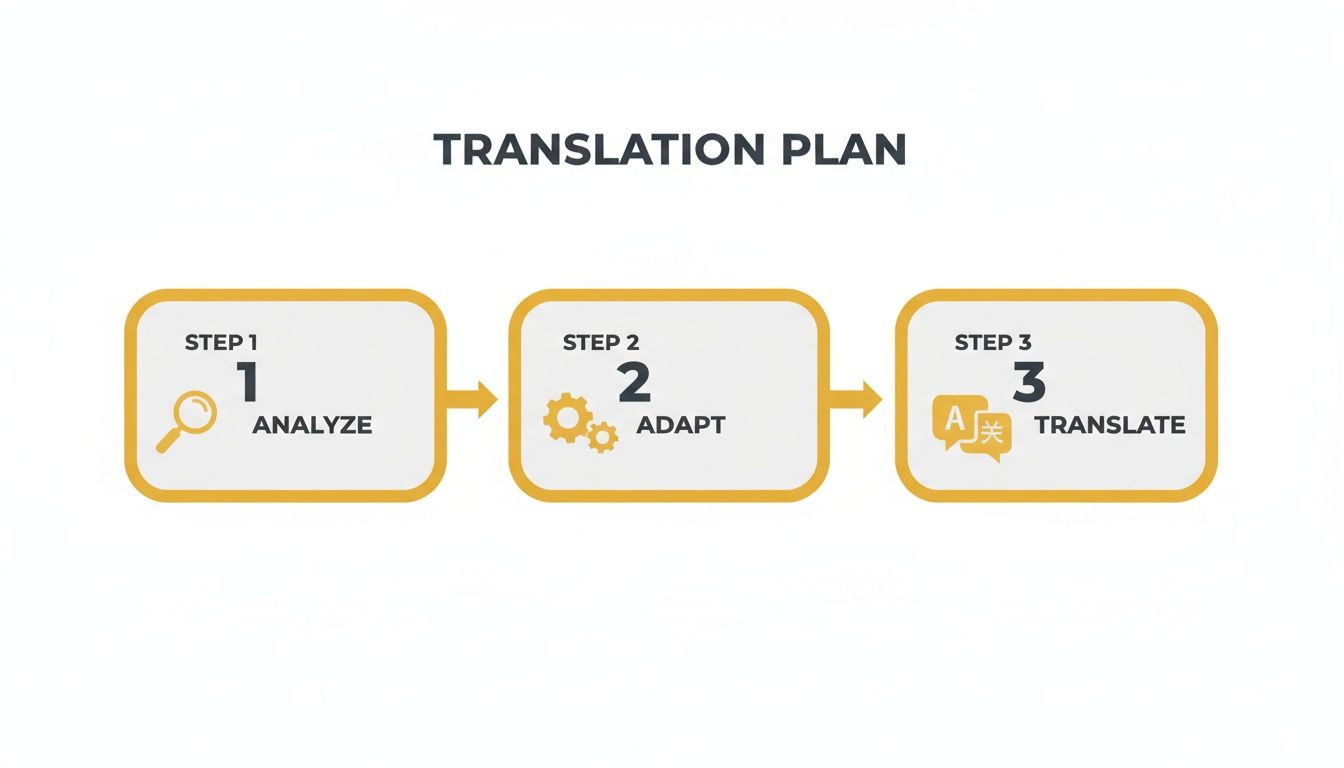
As you can see, the actual translation is the final creative step after you've analyzed the content and decided how to adapt it.
Refining Your Work In The Studio
Now for the fun part—the Studio Workspace. This is where you roll up your sleeves and turn the AI's groundwork into a final product that feels genuinely human.
The Split View in the subtitle editor is a game-changer here. Just toggle it on, and you’ll see the original Indonesian text right beside your English translation. Having them side-by-side is absolutely crucial for making sure you’ve captured the true meaning and tone.
When you click on an English line to edit it, the video automatically pauses, so you can focus without the video running ahead. No more frantic pausing and rewinding.
Pro Tip: For perfect timing, pay attention to the audio waveform. You can drag the start and end points of any subtitle to line it up exactly with the speaker's voice. This gets rid of those awkward delays and ensures the text pops up at just the right moment.
This is what elevates a basic translation to something special. You can tweak everything from a single word to the timing of an entire scene. If you want to get into the nitty-gritty of the technical side, I’ve written more about how to audio translate to English. It’s this hands-on editing that makes the final video feel natural and engaging for your new audience.
Crafting Subtitles That Resonate With English Viewers
Once you’ve got your initial Indonesian to English translation, the real work begins. The best subtitles are the ones you don't even notice—they just melt into the viewing experience, letting the story shine. Getting to that point takes a bit more finesse than just swapping words.
The first hurdle is technical precision. I see this all the time: subtitles that are way too long or break in weird spots. Your viewer should be able to read the entire subtitle in a single glance, not have their eyes darting back and forth across the screen.
Best Practice: Keep subtitles to a maximum of two lines, and try to keep each line under 42 characters. This is the sweet spot for readability, ensuring the text is quick to digest without cluttering the picture.
Adapting Cultural Nuances
This is where things get tricky. How do you translate Indonesian cultural references that just don't have a direct English equivalent? Think about slang, formal honorifics like Bapak or Ibu, or local jokes that would fly right over an English-speaking viewer's head.
Forget literal translation here; it would just be confusing. Your real job is to find a functional equivalent. What's the feeling or intent behind the original phrase? Find an English expression that hits the same emotional note, even if the words are totally different. This is the secret to making your content feel authentic, not like a clunky translation.
It's an interesting balancing act. A study on Twitter translations found that 41% of translations were still literal, with adaptation coming in second at 18%. This shows that while deep adaptation is vital, there's still a place for direct translation, especially in the fast-paced world of social media where Indonesia has a massive 167 million users. The key is knowing when to use which approach.
Visual Polish and Readability
What your subtitles say is only half the battle. How they look is just as important. If they have poor contrast, a tiny font, or jarring colours, people will just click away.
This is where having good styling options comes in handy. Inside the TranslateMom Studio, you can head over to the Style tab and tweak everything until it’s perfect.
- Font: Stick with a clean, sans-serif font. It’s the easiest to read on-screen.
- Colour & Outline: There's a reason white text with a thin black outline is the industry standard—it works. It’s clear against almost any background.
- Background: If you have a really busy or bright scene, adding a semi-transparent black box behind the text can be a lifesaver for legibility.
Taking a minute to make these small adjustments gives your video a professional, polished feel. You can even create popular "Karaoke" style animations where words highlight as they are spoken, which is perfect for social media shorts. And once you've nailed the basics, you can explore the wider world of YouTube closed captioning to make your content even more accessible.
For a more detailed breakdown of the subtitling process, check out our guide on how to add subtitles to a video. When you're ready to export, SRT or VTT files are your best bet for flexibility across different platforms.
Using AI Dubbing To Elevate Your Content
While well-crafted subtitles are a must-have for many projects, sometimes you need to go a step further. AI dubbing completely changes how people engage with your content, shifting the experience from reading to listening.
This makes your videos far more immersive and accessible for an English-speaking audience.
Think about it. For content like documentaries, online courses, or detailed interviews, a natural-sounding English voiceover lets viewers focus entirely on the visuals. They can absorb the information without their eyes darting back and forth to read captions. Dubbing is also a fantastic option for videos aimed at younger kids or anyone who finds reading subtitles a bit of a chore.
Generating Your English Audio Track
Getting started with an AI-dubbed track is pretty simple. Before jumping into the dubbing itself, it's worth checking out the best AI video generators which can really help with the initial content creation.
Once your video is ready, a tool like TranslateMom handles the heavy lifting.
Inside the New Task screen, you'll upload your Indonesian video, pick your languages, and just select the Dubbing service. The AI then gets to work, transcribing and translating the script before generating a completely new audio track in English with a synthetic voice. You can even pick from different voice styles to match your brand's personality.
Pro Tip: Before you hit that "generate" button, always give the translated script a quick once-over. The AI translation gives you a solid base, but a human touch is what makes it shine. You can smooth out awkward phrasing, fix any names, and double-check technical jargon. This little bit of polish is the secret to making the final audio sound authentic, not robotic.
Ensuring High-Quality AI Dubs
The tech behind Indonesian to English translation and voice synthesis has improved by leaps and bounds. Modern Neural Machine Translation (NMT) is incredibly accurate. In fact, studies show that in spoken-language scenarios, domain-adapted models are preferred by over 50% of human evaluators for their natural sound.
This is exactly why AI dubbing is now a genuinely great option, even for long-form videos.
After the AI generates the dubbed audio, a final quality check is an absolute must. Listen through the entire video and keep an ear out for a few key things:
- Pronunciation: Are names, brands, or specific Indonesian places pronounced correctly?
- Pacing and Emotion: Does the tone and speed of the dubbed voice match the energy of the person on screen?
- Audio Mix: Is the new English voiceover properly balanced with the original video's background music and sound effects?
By pairing powerful AI with a little bit of human oversight, you can create a dubbed video that feels completely natural to your English-speaking viewers. If you want to dive deeper into what today's tools can do, check out our guide on the AI video translator.
Finalizing Your Project With Quality Checks And Exporting
You've done the heavy lifting with the translation and editing, but don't rush to the finish line just yet. This final phase—the last 10% of the work—is what really separates a decent project from a truly great one. It’s all about quality control, catching those tiny mistakes, and making sure your Indonesian to English video feels completely polished for its new audience.
Before you even think about that export button, a thorough review is non-negotiable.
First, just read. Go through the entire English subtitle track and hunt for any stray grammar mistakes, typos, or clunky phrasing. A great trick I always use is to read the subtitles out loud. You'll be amazed at how quickly you can spot sentences that look fine on the screen but just sound… weird.
The Technical Quality Checklist
Words are only half the battle; the technical side has to be flawless, too. This is where a robust editor like the one inside the TranslateMom Studio really proves its worth.
Here’s a quick-hit checklist to run through:
- Synchronization Check: Is the timing spot-on? The audio waveform is your best friend here. Play the video from start to finish and make sure every subtitle pops up and disappears exactly when it should. Nothing screams "amateur" like captions that lag behind or cut off a speaker mid-sentence.
- On-Screen Text: This is a classic rookie mistake. Did you remember to translate any Indonesian text that shows up inside the video itself? Think signs, presentation slides, or graphics. You'll likely need to add a dedicated subtitle to cover these for your English-speaking viewers.
- Formatting Consistency: Check for consistency in your font, size, and colour. The Style tab makes it easy to apply a uniform look across the entire video, so there are no distracting changes part-way through.
Crucial Tip: The single best thing you can do for quality control is to get a fresh pair of eyes on it—ideally, a native English speaker. They'll instantly catch subtle cultural nuances or phrasing that sounds just a little "off" to a native ear. This kind of feedback is pure gold.
Choosing Your Export Format
Once you’re happy with the final product, it’s time to get it out into the world. How you export depends entirely on where you plan to post your video. In TranslateMom, you have two main options.
- Burn-in (Export Video): This choice permanently "bakes" your stylized subtitles right onto the video file. You'll get a single MP4 file that’s ready to upload, which is perfect for platforms like Instagram, TikTok, or X where users don’t have an option to turn captions on or off.
- Download Subtitles (SRT, VTT): This gives you a separate text file with all your timed captions. This is the industry standard for places like YouTube or for professional editing software like Premiere Pro or Final Cut. It offers the most flexibility, allowing viewers to toggle captions and letting you make tweaks later without having to re-render the whole video.
Picking the right format ensures all your hard work pays off, making your content look professional and accessible on any platform.
Got Questions About Indonesian to English Translation?
When you’re diving into a video translation project, a few common questions always seem to pop up. Figuring out timelines, choosing between subtitles or dubbing—getting these details right from the start makes everything go a whole lot smoother.
Let's clear up some of the most frequent queries I hear from creators.
How Long Will The Translation Take?
The honest answer? It depends. The biggest factors are your video's length and the method you use. Doing it all by hand could take you hours upon hours, but thankfully, AI tools have completely changed the game.
If you're using a tool like TranslateMom, the first pass—the automatic transcription and translation—is incredibly fast. A 10-minute video can be done in just a few minutes. The real variable is the time you spend on the review. I always tell people to budget about 30 to 60 minutes of review time for every 10 minutes of video if you're aiming for that polished, professional feel. This is where you'll tweak the subtitles, check the timing, and make sure the language flows perfectly.
Subtitles Or Dubbing? Which One Should I Use?
This is a big one, and there's no single right answer. It’s a strategic choice that really comes down to your content and where your audience is.
Subtitles are your best friend for social media. Think TikTok, Instagram, or any platform where people often watch with the sound off. They're also great for preserving the authentic voice and emotion of the original Indonesian speaker.
Dubbing is all about creating a seamless, "lean-back" experience. It's the go-to for longer-form content like documentaries, online courses, or detailed interviews where you want your audience fully absorbed in the visuals, not reading text.
If you're creating content for language learners, you can even get the best of both worlds. TranslateMom’s Dual Language Mode is a neat feature that stacks both Indonesian and English subtitles on the screen at the same time.
Can AI Really Translate Indonesian Slang?
Modern AI has gotten surprisingly good at picking up on context, idioms, and even some informal language. But it's not perfect, especially with hyper-local slang that changes every other week.
I like to think of AI as an amazing assistant that gets you 90% of the way there. It produces a fantastic first draft, but a human touch is still essential for the final polish.
Research backs this up. One study on Google Translate’s accuracy for English-to-Indonesian sentences clocked it at 60.37%. That’s not bad, but it highlights why a basic tool isn't enough for professional work. Platforms like TranslateMom use more advanced models that blow past that baseline, but they also give you the critical editing tools to fix any errors. You can dive into the full research on translation accuracy if you're curious about the benchmarks.
That final manual review is your chance to make sure cultural jokes land, nuances are captured, and nothing sounds clunky or out of place.
Ready to take your Indonesian content global? With TranslateMom, you can create professional subtitles and natural-sounding AI dubs in minutes. It's a game-changer for breaking down language barriers.