Diving into English to Mandarin translation isn't just about switching out words. It's a deep dive into culture, context, and figuring out exactly who you're talking to. Get this right, and your message will land perfectly.
The very first fork in the road is a big one: choosing between Simplified and Traditional Chinese. This single decision shapes your entire project and determines how well you connect with your intended audience.
Laying the Groundwork for Mandarin Translation
Think of translating English to Mandarin as localization, not just a word-for-word swap. You're essentially rebuilding your message to feel natural and authentic in a completely different linguistic and cultural setting. It's less like a paint job and more like a custom renovation.
This means you have some big calls to make right from the get-go. The script you pick, the tone you adopt, and the tools you use all play a huge role in the final quality of your work.
The Big Picture Decisions
Before you even touch a single sentence, you need to map out your strategy. Every choice you make caters to a specific group of people for a specific reason.
For example, a splashy marketing video targeting mainland China will need a totally different flavour than a university lecture meant for an audience in Taiwan. This is where a platform like TranslateMom really comes in handy. When you're in the Processing Phase of a new task, you can set your Target Language and script right away. This gives the AI a solid, accurate foundation to build on, saving you a ton of time and headaches later.
To give you a clearer picture, let's break down these initial choices.
Key Decisions in English to Mandarin Translation
| Decision Point | Simplified Chinese (简体) | Traditional Chinese (繁體) | Key Consideration |
|---|---|---|---|
| Target Audience | Mainland China, Singapore, Malaysia | Taiwan, Hong Kong, Macau | Who are you trying to reach? This is the most important question. |
| Platform | Social media platforms popular in the PRC (e.g., Weibo, Douyin) | Platforms like YouTube, Facebook, and Instagram are more common. | Where will your content be seen? |
| Tone & Style | Can be more direct and modern. | Often prefers a more formal or nuanced tone, especially in business. | What kind of impression do you want to make? |
This table just scratches the surface, but it shows how your target market dictates your entire approach.
The need for spot-on Mandarin translation is exploding. In California alone, the Chinese-speaking population has climbed past 1.2 million residents, making it the state's third most common language. As of 2021, a staggering 43.9% of all Californians spoke a language other than English at home. You can dig into more of these stats on imminent.translated.com. This isn't just a niche market anymore; it's a massive and growing audience that expects culturally aware content.
My takeaway: The real goal isn't just to be understood. It’s to make your audience feel something. Great localization makes your content seem like it was born and bred in Mandarin, which is how you build genuine trust and connection.
Ultimately, a great translation project starts way before you hit the "translate" button. It begins with knowing your audience inside and out and having a clear plan. When you make smart choices about the script and use tools that put you in control, you're setting yourself up for success.
Simplified vs. Traditional Chinese: Making the Right Call
Before you even think about translating a single word from English to Chinese, you’ve got a big decision to make: which writing system will you use? This isn't just a technical choice; it’s a cultural one that sets the stage for how your audience connects with your content.
The choice boils down to Simplified versus Traditional Chinese, and it’s all about who you’re trying to reach.
Simplified Chinese (简体, jiǎntǐ) is the official script in Mainland China, Singapore, and Malaysia. It was introduced back in the 1950s to boost literacy, so the characters have fewer strokes and are, well, simpler. On the other hand, Traditional Chinese (繁體, fántǐ) uses the original, more complex characters and is the standard in Taiwan, Hong Kong, and Macau.
Your decision hinges entirely on where your target audience lives and their cultural expectations. Get this wrong, and you risk looking out of touch.
Let Your Audience Guide Your Choice
Let’s put this into a real-world context. Say you’re launching a new app and your main market is Shanghai. Using Traditional Chinese would immediately feel strange and old-fashioned. Your audience there expects the modern, clean look of Simplified characters. It shows them you get their market.
Now, flip the script. Imagine you're producing a documentary about ancient Chinese history aimed at viewers in Taipei. Using Simplified Chinese here could come across as jarring or even disrespectful to their cultural heritage. In this case, Traditional characters are a must to convey authenticity and a respect for history.
Choosing the right script shows your audience you've done your homework. It’s a sign of respect that builds immediate trust and makes your content feel like it was made specifically for them, not just carelessly translated.
How to Pick Your Script in a Tool
Thankfully, modern tools are built to handle this. If you’re using a platform like TranslateMom, making this decision is baked right into the workflow, so you can’t miss it.
When you kick off a new translation project, here’s how simple it is:
- Start a New Task: Just upload your video file or pop in a link from a site like YouTube.
- Set Up Your Project: Next, you’ll define the basics of your project.
- Select Your Target Language: This is where the magic happens. In the dropdown menu for Target Language, you won’t just see "Chinese." You'll find specific options like "Chinese (Simplified)" or "Chinese (Traditional)."
By selecting the right one from the get-go, you're telling the AI which character set to use for the entire translation. This simple click saves you the massive headache of trying to convert thousands of characters later. It’s the first and most critical step to creating a translation that truly connects with your viewers, whether they're in Beijing or Taipei.
Your Workflow for Video Translation
Alright, let's get our hands dirty and move from theory to action. This is where we’ll walk through the entire process of translating an English video into Mandarin using a purpose-built tool like TranslateMom. Following this workflow turns a complicated job into a series of simple, straightforward steps.
Everything starts on the New Task screen. Think of this as your command centre for any new project, whether you're working with a video file sitting on your computer or a clip from social media.
You have two main ways to get your video into the system:
- File Upload: The classic drag-and-drop. Just pull your video file into the browser window. If you’re a fan of keyboard shortcuts, just hit
Fto pop open the file picker and save yourself a couple of clicks. - Link Import: This is a lifesaver for social media content. You can paste a URL directly from platforms like YouTube, Twitter (X), TikTok, or Instagram. The app then grabs the video straight from the source. Super efficient.
Setting Up Your Translation Task
Once your video is loaded, it’s time to tell the AI what you need. You’ll be prompted to set a few key parameters that guide the whole project.
First, you'll set the Source Language to English. Next, you'll choose the Target Language – this is where you pick either Simplified or Traditional Chinese based on the audience research we talked about earlier.
Finally, you select the service you need. For this workflow, you'll pick Translation. This tells the system to first create a transcription of the original English audio and then generate a brand new set of subtitles in your chosen Chinese script.
Pro Tip: Don't rush this setup stage. Double-checking that your source and target languages are correct here can save you from having to start all over again. It’s a tiny step that ensures the AI gets off on the right foot.
The demand for high-quality Mandarin translation is booming, especially in major cities. For example, during the 2019-2020 fiscal year, San Francisco city departments handled 26,726 interactions in Mandarin, and a massive 31.5% of all translated documents were in Chinese.
Diving Into the Studio Workspace
The real magic happens in the Studio Workspace. This is where the AI's output meets your human expertise, giving you total control over the final product.
On the left, you’ll see the Special Player. This isn't just a standard video player; it’s a custom-built engine that gives you a precise, real-time preview of how your subtitles will look in the final video.
To the right is the Subtitle Editor. It’s a scrolling list of every single caption, and this is where you’ll do most of your fine-tuning.
This flowchart maps out how to link your audience knowledge directly to the right script choice.
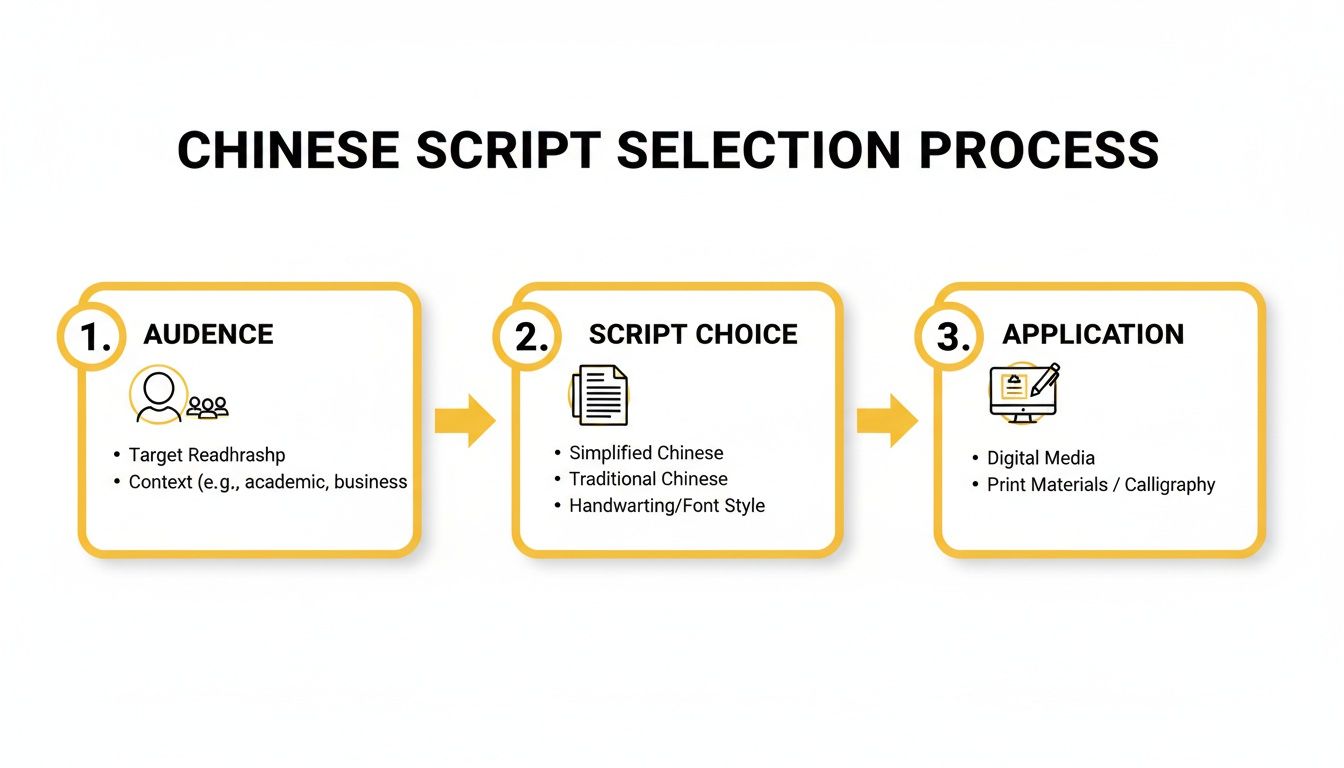
It’s a great visual reminder that knowing your target demographic is the first and most important step before you even think about which Chinese script to use.
Refining Your Mandarin Subtitles
When you first land in the editor, you'll see the AI-generated Mandarin translation ready to go. Now it's time to add that human touch. One of the handiest tools for this is the Split View.
Clicking this button shows the original English text right next to your Mandarin translation. This side-by-side comparison makes spotting any issues with accuracy, context, or nuance a breeze.
Here are a few things you’ll be doing in the editor:
- Text Editing: Just click on any subtitle line to start typing. The video player will pause automatically, letting you concentrate on perfecting the wording without any distractions.
- Precision Timing: Look below the text editor and you'll see a visual audio waveform. This is fantastic for syncing your subtitles perfectly with the spoken words. You can just drag the start and end points of a caption to align it with pauses and speech patterns.
- Keyboard Shortcuts: To really speed things up, a few shortcuts are your best friend. Use the spacebar to play or pause the video, and the
[or]keys to shift a subtitle line up or down in the timeline.
If you want to dig deeper into the video translation process from start to finish, you might find our detailed guide on how to translate videos really helpful.
Finalizing the Look and Feel
Getting the words right is only half the battle. How your subtitles look is just as important for keeping your audience engaged. The Studio Tabs panel gives you complete control over the visuals.
In the Style tab, you can tweak everything—font, size, colour, outlines, and shadows. Every change you make shows up in the player instantly. This is also where you can add cool "Karaoke" style effects, which work incredibly well for short-form content on social media.
If you’re building a brand, the Brand tab lets you upload a custom logo or watermark. You can easily resize it and place it anywhere on the video frame for consistent branding.
Once you’re happy with the translation and the styling, you're ready to go. You can either burn-in the subtitles to create a new video file or just download the subtitle file itself (like an SRT or VTT) to use in another video editor.
Advanced Presentation: Karaoke Captions, Dubbing & More
A first-rate translation is only half the battle; it needs a presentation that hooks viewers and doesn't let go. When you translate English to Chinese Mandarin for video, you have to think beyond just putting static text on the screen. It’s all about creating an experience.
This means getting creative with advanced subtitle styles and knowing when to swap out subtitles for a full AI voiceover. Thankfully, modern tools are built to make this incredibly easy. With the right strategy, you can produce slick, professional videos that feel native to a Mandarin-speaking audience.
Create Eye-Catching 'Karaoke' Subtitles
Want to stop the scroll on social media? Use "Karaoke" style captions. It's a simple but powerful trick: words are highlighted in real-time as they're spoken, forcing the viewer's eyes to follow along.
In TranslateMom, this is dead simple. After you've nailed down your Mandarin translation in the Studio Editor, just click over to the Style tab. You'll find a bunch of presets that animate your text for you. The app does all the heavy lifting by automatically tracking word timings.
The best part? If you tweak a sentence, the Smart Sync feature automatically re-aligns the animation. No more manual adjustments.
This dynamic style is a game-changer for:
- Social Media Clips: Perfect for TikTok, Instagram Reels, and YouTube Shorts where you have seconds to grab attention.
- Marketing Videos: Makes key phrases and calls-to-action impossible to miss.
- Lyric Videos: The classic use case, letting viewers sing along effortlessly.
Use Dual Language Mode for Learning Content
If you're creating educational videos or content for language learners, showing both English and Mandarin at the same time is a huge win. This helps viewers make instant connections between the original English and the translated Mandarin.
TranslateMom’s Dual Language Mode was built specifically for this. With one click, it neatly stacks the English and Mandarin subtitles on top of each other right in the video. Suddenly, your video isn't just a video anymore—it's a powerful study tool that lets viewers compare vocabulary and sentence structure on the fly.
This simple feature can massively boost the value and rewatchability of your educational content. You're not just translating; you're teaching.
When to Pick AI Dubbing Over Subtitles
Subtitles are great, but sometimes, you need to go a step further and replace the original audio track completely. AI dubbing has come a long way, offering a surprisingly natural-sounding Mandarin voiceover without the high cost and long turnaround of hiring professional voice actors.
Deciding between subtitles and dubbing often comes down to your content. Documentaries, e-learning courses, and corporate training videos are prime candidates for dubbing. It allows the viewer to absorb the visual information without the distraction of reading. If you're new to the concept, you can learn all about what dubbed means and how it's used.
Inside TranslateMom, kicking off the dubbing process is easy. During your project setup, instead of picking "Translation" in the Processing Phase, you just select the Dubbing service. The platform then generates the full Mandarin AI audio track, ready for you to preview and export with your video.
Choosing Between Subtitles and AI Dubbing
Making the right choice between subtitles and dubbing can feel tricky, but it really depends on your goals, content, and audience. This table breaks down the key factors to help you decide which approach will have the most impact.
| Factor | Best for Subtitles | Best for AI Dubbing | TranslateMom Feature |
|---|---|---|---|
| Content Type | Social media, short clips, music videos, interviews where the original speaker's voice is key. | Documentaries, e-learning, tutorials, animated content, corporate training. | Both options are available during project setup. |
| Viewer Engagement | Great for platforms where users watch with sound off (e.g., Facebook, Instagram feeds). | Creates a more immersive, "lean-back" viewing experience where the user can focus on visuals. | Offers dynamic subtitle styles and natural-sounding AI voices. |
| Audience Preference | Preferred by viewers who want to hear the original performance and tone. Common in film and drama. | Preferred by audiences who dislike reading captions or for content aimed at younger viewers or those with visual impairments. | High-quality AI voices cater to discerning listeners. |
| Learning Context | Ideal for language learners who benefit from seeing the written text in both languages. | Useful for instruction where following on-screen actions is critical, removing the need to read. | Dual Language subtitles or a full audio dub track. |
Ultimately, both methods help make your content more accessible. Subtitles are versatile and quick, while AI dubbing provides a seamless, immersive experience for specific types of content.
And remember, these choices have a much bigger impact than you might think. It's worth digging into the hidden power of captions for accessibility, SEO, and engagement. Mastering these features lets you tailor your localization strategy to perfectly match your content and your audience, ensuring your message truly lands.
Ensuring Accuracy and Cultural Relevancy
AI gives you a fantastic head start, but let's be real—human oversight is what turns a decent translation into a great one. This final quality assurance (QA) step is where you catch the subtle things machines just don't get, making sure your content genuinely connects with your Mandarin-speaking audience.
Sure, automated tools are powerful. But they often stumble over cultural nuances. Think about it: idioms, slang, and specific cultural references almost never have a direct one-to-one equivalent. An expression like "break a leg" makes zero sense when translated literally into Mandarin. A machine might not grasp that you're just wishing someone good luck.
This is exactly why a human review is non-negotiable. It’s not just about grammar; it’s about polishing the AI's output so it feels natural, respectful, and perfectly aligned with your brand.
Your Human Reviewer Checklist
When you hand off your translation for review, make sure the person looks beyond just grammar and spelling. Their focus needs to be on how the message feels to a native speaker.
Here's a quick and practical checklist for your reviewer:
- Tone and Formality: Does the language fit the context? A casual, slang-filled tone is perfect for a TikTok video, but it would feel completely out of place in a formal business presentation.
- Cultural References: Are there any English-centric jokes, holidays, or examples that just won't land? These need to be localized, not just translated word-for-word.
- Brand Voice Consistency: Does the Mandarin translation actually sound like your brand? Whether your vibe is playful, professional, or authoritative, that personality needs to shine through.
- Terminology: Are industry-specific terms translated correctly and, just as importantly, used consistently throughout the content?
The market puts a high price on this level of quality. In California, for instance, skilled Mandarin translators pull in an average of $52,650 annually, with salaries in tech hubs like Palo Alto climbing over $62,000. This shows just how valuable professional, culturally-aware translation really is.
Using Collaboration Tools for a Perfect Finish
Thankfully, modern platforms are built to handle this crucial human-in-the-loop process. Forget emailing files back and forth. You can use integrated features to streamline feedback and nail the final version.
In TranslateMom, the whole workflow is designed for teamwork. The Suggestions feature is a game-changer. It lets a reviewer propose changes to specific subtitle lines without just overwriting the original. This creates a clear, trackable feedback loop where your team can discuss and approve edits before they go live.
My takeaway: Stop thinking of the human review as just fixing mistakes. See it as adding that final layer of cultural intelligence AI can't replicate yet. This is what builds genuine trust and connection with your new audience. If you want to see how top teams implement this, digging into case studies on agile localization strategies is a great place to start.
Mistakes can happen, but they don't have to be permanent. Tools with version control are your safety net. TranslateMom's History function, for example, tracks every single change. If an edit doesn't work out, you can easily revert to a previous version with a click.
This blend of AI speed and human-led refinement is the secret to mastering your subtitling and translation efforts.
Frequently Asked Questions
When you're diving into translating content from English to Chinese Mandarin, a few common questions always pop up. It doesn't matter if you're a YouTuber, a marketing manager, or building a training course—getting the details right is key. Let's walk through some of the things people ask me most often.
How Long Does It Take to Translate a Video?
This really comes down to the video’s length and the tools you're using. If you go the old-school route with a translation agency, you could be waiting days for a result.
But with an AI-powered platform like TranslateMom, the initial machine translation is done in minutes. Seriously. The bulk of your time will actually be in the review stage. For a 5-minute video, a good reviewer might spend 20-30 minutes checking the subtitles for cultural nuances and making sure the timing is perfect. The AI does the heavy lifting, you just add that crucial human touch.
Can I Use the Same Translation for Mainland China and Taiwan?
You can, but you really, really shouldn't. This is a classic rookie mistake.
Mainland China and Singapore use Simplified Chinese, while Taiwan and Hong Kong use Traditional Chinese. Using the wrong one instantly signals to your audience that you haven't done your research, and it can come off as unprofessional or even disrespectful.
When you're setting up your project in TranslateMom, you'll see separate options for "Chinese (Simplified)" and "Chinese (Traditional)" in the Processing Phase. Make sure you pick the right one for your audience.
This isn't just about different characters—it's about showing cultural awareness. Getting this right tells your viewers you understand and respect their local context.
What Is the Difference Between Subtitles and AI Dubbing?
Good question. They serve different purposes.
Subtitles are the translated text you see at the bottom of the screen while the original English audio is still playing. They're fantastic for social media clips where people often watch with the sound off.
AI dubbing, on the other hand, completely replaces the original English voice with a new, AI-generated Mandarin voiceover. This creates a much more immersive experience, perfect for things like documentaries, e-learning courses, or any content where you want the viewer to just sit back and watch without reading.
In TranslateMom, you just choose between Translation (for subtitles) or Dubbing when you start a new task.
Do I Need to Know Mandarin to Use a Translation Tool?
Nope, you don't need to be fluent. But—and this is a big but—you absolutely need a native Mandarin speaker to review the final output. AI gives you a fantastic head start, but it can miss idioms, subtle jokes, and the specific jargon of your industry.
Tools like TranslateMom are built for this kind of teamwork. You can manage the entire technical side of things, from uploading the video to styling the captions. Then, you can bring in a Mandarin-speaking colleague who can use the Split View editor to compare the English and Chinese versions side-by-side to make quick, accurate edits.
Can the Tool Handle Different Accents in English?
Yes, absolutely. The AI transcription models used today are trained on a massive amount of audio data from all over the world. They can easily handle North American, British, Australian, and many other English accents.
This first step—getting an accurate transcript—is the foundation for a great translation. When you select English as your Source Language in TranslateMom, the AI gets to work creating a clean transcript, which then becomes the source for the final Mandarin output. A clean start means a better finish.
Ready to get your videos in front of a Chinese-speaking audience? With TranslateMom, you can subtitle, translate, and even dub your content in just a few minutes. Start your free trial today and see how easy it is.