Getting a Cantonese-to-English translation right is so much more than just swapping out words. It's about capturing the very specific cultural vibe, the tone, and even the slang that makes the language so vibrant.
If you want your message to actually land with a global audience, you need tools that get this. Modern AI platforms are a surprisingly good place to start, but you have to know what you’re working with.
Why a Nuanced Cantonese Translation Is So Important
Here’s the thing about Cantonese: it's a minefield for basic translation software. Unlike a lot of other languages, it has this crazy complex tonal system—we're talking up to nine different tones. A single syllable can mean completely different things just based on its pitch.
A simple word-for-word translation engine will steamroll right over that context. The result? Content that feels clunky, awkward, or just plain wrong.
Then you have the slang and idioms. Cantonese is packed with them, and they’re tangled up in the culture. Your standard machine translation tool often throws its hands up, leading to translations that can completely alienate the very people you're trying to reach.
Actually Connecting, Not Just Translating
To genuinely connect, you need more than just technical accuracy. You need cultural fluency.
Take Hong Kong, for example. An incredible 96% of the population speaks Cantonese. It's the lifeblood of the city, making it a critical language for any creator or business wanting to make an impact there.
Getting the translation right means your video, whether it's a marketing campaign or a vlog, feels natural and respectful to native speakers. This is where more advanced, AI-powered platforms like TranslateMom really start to shine.
Tools built to handle linguistic complexity give you a much, much stronger starting point. They can actually analyze the audio for context, delivering a first-draft translation that keeps more of the original flavour. From there, you can polish it to perfection.
Instead of getting a flat, literal script, these platforms provide a culturally-aware foundation. They help close the gap between basic word replacement and true localization, which is non-negotiable when you're talking to millions of Cantonese speakers around the world.
And if you’re also working with Mandarin, you’ll quickly see that the approach to translation is a whole different ball game.
Preparing Your Cantonese Video for Accurate Translation
Before you even think about translation, the quality of your original video file will make or break the entire project. Think of it as laying the foundation for a house—if it's weak, everything built on top will be shaky, and even the most advanced AI tools will stumble. Your number one goal is to give the translation software the cleanest audio possible to work with.
For an AI to transcribe accurately, high-quality, clear audio is completely non-negotiable. These models are trained to listen for specific phonetic patterns, so any background noise, loud music, or multiple people talking at once will throw them off and introduce errors. Just take a moment to listen to your video before uploading. Is the main speaker's voice loud and clear?
If you're creating new content, getting clean audio from the start will save you hours of headaches later. For some great, practical tips on getting better sound with the gear you already have, check out our guide on audio recording with an iPhone.
A little organization goes a long way, too. Keep your video files, scripts, and any notes tucked away in a dedicated folder for each project. It’s a simple habit that prevents a lot of confusion, especially when you're juggling multiple videos.
Identifying Dialect and Tone
Here's something a lot of people overlook: not all Cantonese is the same. The Cantonese in a formal Hong Kong news broadcast sounds very different from a casual street interview in Guangzhou. Knowing where your audio comes from helps you anticipate where the AI might get tripped up by regional slang or different turns of phrase.
You also need to consider the feeling of the video. Is the speaker being serious, telling a joke, or teaching something? Understanding this context is key to making sure the final English translation carries the same emotional weight and intent.
A machine can translate words, but only a human touch can ensure the translation captures the speaker's true spirit. Understanding the video's context is your first step in preserving that spirit.
Getting Started with TranslateMom
Once your video is prepped and ready, getting it into the system is easy. TranslateMom is a browser-based tool, so there’s nothing to download or install. You can kick off a new project—which we call a "Task"—in two simple ways.
- File Upload: Just drag and drop your video file right into the New Task screen. It’s built to handle large, high-resolution files without any issues.
- Link Import: You can also just paste a URL from platforms like YouTube, TikTok, or even Twitter (X). The app pulls the video in for you automatically, which really simplifies the workflow.
Taking a few minutes to get this initial step right—prepping your audio and getting it into the system cleanly—sets you up for a much smoother and more accurate translation process. A little prep work here really pays off later.
Getting Started with the TranslateMom Workflow
Once you’ve prepped your Cantonese video, it's time to jump into the TranslateMom studio and start the real work. This is where we’ll turn that raw audio into perfectly polished English subtitles. The whole process is really intuitive, designed to take you from a simple upload to a finished product without any headaches.
First thing’s first: you’ll need to kick off a "New Task" inside TranslateMom. Getting your media in is super easy. You can drag and drop your video file right into the browser, or if it's already online, just grab the link from YouTube or TikTok and paste it in.
This flow chart gives you a quick visual of the prep stages that happen before you even hit that "New Task" button.
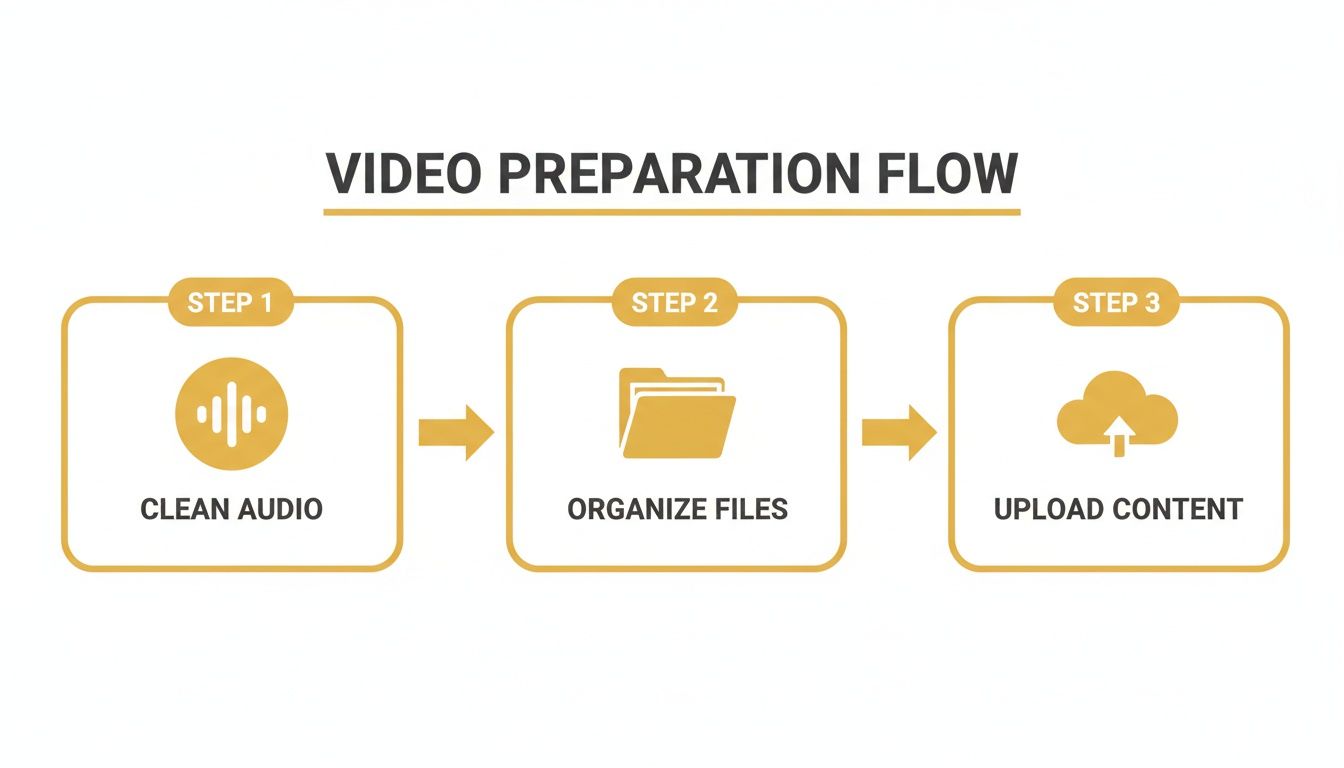
Trust me, starting with clean audio and organized files makes the rest of the job so much smoother.
Configuring Your Cantonese to English Project
With your video imported, the next screen asks you to set up the translation project. This is a quick but crucial step that tells the AI exactly what to do.
- Set Your Source Language: Find 'Cantonese' in the dropdown menu. This lets the AI know what language it’s listening for.
- Choose Your Target Language: Next, select 'English' as the language for your subtitles.
- Pick the Right Service: You'll see a couple of choices here. For this job, you'll want to select ‘Translation’ to generate English subtitles from the spoken Cantonese.
After you confirm these settings, the platform starts processing everything. It’s pretty quick—usually just a few moments to get the initial transcript and translation ready for you.
To give you a clearer picture, here’s a quick breakdown of how these steps fit into the overall workflow.
TranslateMom Workflow for Cantonese to English
This table summarizes the main phases of your project, from start to finish.
| Phase | Action in TranslateMom | Key Tip |
|---|---|---|
| Import | Create a "New Task" and upload or link your video. | A direct file upload often processes faster than a link. |
| Configuration | Set source to 'Cantonese' and target to 'English'. | Double-check these settings; it's easy to mix them up! |
| Review & Edit | Use the Studio's Split View to compare transcripts. | This is where you catch nuances and fix awkward phrasing. |
| Timing | Adjust subtitle start/end times with the audio waveform. | Look for flat lines in the waveform to spot silent gaps. |
| Finalize | Run a final QA check and use the "Export" button. | Export as an SRT file for flexibility or embed them directly. |
Following this simple path will get you a high-quality translation every time.
Navigating the Studio Workspace
The Studio is where you’ll do all the fine-tuning. It's a powerful editor built for getting things just right. When you translate from Cantonese to English, my favourite feature is the Split View.
Toggling on the Split View shows you the original Cantonese transcript right next to the English translation. It's an absolute game-changer for making sure the English text truly captures the meaning and feel of the original.
Seeing both languages side-by-side makes it so much easier to spot any translation hiccups or find a more natural way to phrase an idiom.
While I love TranslateMom, it’s always smart to see what else is out there. Exploring different video translation tools can help you find features that really click with your personal workflow.
Fine-Tuning Subtitle Timing with the Waveform
One of the most powerful features for getting that professional touch is the visual audio waveform in the subtitle editor. This is basically a picture of your sound, showing you exactly where people start and stop talking.
No more guesswork with timings. You can see it all.
- Drag to Adjust: Just click and drag the edges of a subtitle block to line it up perfectly with the audio waveform. This is how you fix those annoying subtitles that pop up too early or hang around too long.
- Spot Silence: The waveform clearly shows you where the pauses and dead air are, letting you tighten up the captions for a much cleaner viewing experience.
This level of control is what makes your subtitles feel perfectly synced with the original Cantonese dialogue, giving your video that polished, high-quality feel. And if you're curious about the tech behind all this, our guide on the best AI video translator options is a great place to learn more.
How to Refine Translations for Cultural Context
Think of an AI-generated translation as an incredibly smart first draft. It does the heavy lifting, but it's your human touch that really makes it shine. This is where you step in to "naturalize" the English subtitles, moving past a simple word-for-word translation to capture the original humour, vibe, and cultural spirit of the Cantonese audio.
This is a bigger challenge than you might think. A recent look at Hong Kong-focused benchmarks showed that even the most advanced translators only get things right about 25% of the time when translating from Cantonese to English. That's a huge gap, especially with over 85 million Cantonese speakers worldwide. It shows just how much AI can struggle with slang and tone, a problem explored in projects like CANTONMT and HKCanto-Eval. You can read more about these Cantonese translation benchmarks to see the data for yourself.
That's why your review is so critical. The AI output is the starting point, not the finish line.
Moving Beyond Literal Translations
Your first job is to hunt down and fix phrases that just feel clunky or weird in English. Cantonese is packed with idioms, slang, and ways of addressing people that don't have a direct English counterpart. A literal translation will almost always sound unnatural.
For instance, a common Cantonese phrase for mild frustration might get translated into something that makes zero sense in English. Your task is to find an English expression that carries the same emotional weight so the audience gets the feeling, not just the words.
The goal isn’t to find the perfect English word for every Cantonese word. It’s to find the right English phrase that delivers the same impact and meaning as the original.
This whole process gets a lot easier inside the TranslateMom Studio Workspace. Just pop open the Split View in the Subtitle Editor. You'll see the original Cantonese text right next to the English translation, making it super simple to spot awkward phrasing and smooth it out on the fly.
Leveraging AI for a Better Rewrite
Ever get that feeling where you know a sentence is off, but you just can't nail the right way to say it? That's when TranslateMom's built-in AI tools become your new best friend.
Look for the AI tab in the Studio sidebar. You can highlight a subtitle that isn't working and give the AI a direct command to fix it.
- Prompt for Tone: Ask it to "Rewrite this to sound more casual" or "Make this more professional."
- Prompt for Clarity: Try something like, "Rephrase this so a general audience can understand."
- Prompt for Brevity: A simple "Shorten this sentence" works wonders for making subtitles easier to read.
This is a game-changer for getting past writer's block. It gives you a bunch of different ways to phrase a tricky translation, using the context of your video to give you smart suggestions. By blending the initial AI translation with these AI-powered editing tools and your own cultural know-how, you'll end up with a final product that reads like it was written by a pro.
Styling Subtitles and Creating AI Dubs

You’ve nailed the Cantonese to English translation. Now, let’s make it look good.
How your subtitles appear on screen can be just as crucial as what they say, especially on social media where every second of attention counts.
This is where you shift from wordsmith to creative director. In TranslateMom, this all happens in the Studio Tabs. Head over to the Style tab—this is your command centre for tweaking everything from font family and size to text colour, outlines, and background opacity. The best part? Every adjustment you make shows up instantly on the video player, so you get a live preview of exactly what your audience will see.
Want to add a professional touch? Jump into the Brand tab to upload your logo or a custom watermark and place it anywhere you like on the video frame.
Creating Attention-Grabbing Captions
To really stop the scroll, you need dynamic, animated subtitles. TranslateMom makes it easy to create those engaging "Karaoke" style captions, where words are highlighted as they’re spoken.
This feature is a game-changer for short-form content. The app is smart enough to track word timings, so even if you tweak the text a little, the animation stays perfectly synced with the audio. It’s a simple trick that makes your content feel incredibly polished and professional.
An Alternative to Reading: AI Dubbing
Sometimes, subtitles just aren't enough. For a truly immersive experience, you can generate a full English audio track using AI dubbing. In TranslateMom, when you first set up your project, all you have to do is select Dubbing as your service, and it will create a new audio track in your target language.
This opens up a whole new way for people to engage with your work. If you're serious about localizing your videos, exploring different AI dubbing software platforms can be a huge advantage, helping you create natural-sounding voice-overs that expand your global reach.
Once the AI dub is ready, a thorough review is non-negotiable. Listen closely to the pacing, the emotional tone, and the rhythm. Does the AI voice actually match the original speaker's energy? A great dub should feel so seamless that the viewer completely forgets it isn't the original audio.
This commitment to quality presentation is vital. Consider that in a place like Hong Kong, English usage in professional documents is as high as 85.8%. The expectation for polished, accurate content is incredibly high. By offering both expertly styled subtitles and natural-sounding dubs, you ensure your message doesn't just get across—it lands with the professionalism your audience expects.
Getting Your Finished Video Out Into the World
Okay, so you’ve put in the work. Your translation is spot-on, the subtitles look fantastic, and maybe you've even generated an AI-dubbed track. Now for the final, most important part: exporting and sharing your masterpiece.
How you export your project really comes down to where it’s going to live. Are you throwing it straight onto social media, or is it a piece of a larger puzzle in a video editing project?
Inside TranslateMom, you have a couple of solid options, each built for a different goal. Let's break them down.
"Burning In" Your Subtitles for Social Media
First up is the Burn-in (Export Video) option. Think of this as permanently stamping your subtitles and logo right onto the video footage. When you hit export, the server renders the video with everything baked right in.
This is your go-to for platforms where you need a single, self-contained video file that just works.
- Perfect for Social: It's exactly what you need for direct uploads to TikTok, Instagram Reels, or X (formerly Twitter). No fuss.
- Locks in Your Style: Your custom fonts, colours, and that cool karaoke effect you added? They're now part of the video itself, so they'll look the same on every single device, guaranteed.
- Super Simple: You download one file, and it’s ready to post. No need to juggle separate subtitle files.
Downloading Subtitle Files for More Control
Your other choice is to Download Subtitles. This gives you just the text and timing data in a separate file, usually as an SRT or VTT file. This is the professional’s choice when you need more flexibility.
Downloading an SRT or VTT file is standard practice for platforms like YouTube. It lets viewers turn captions on or off and gives you full control when you're working in professional editing software.
This is the right move when:
- You're a video editor: If you're using software like Premiere Pro or Final Cut, you can import this file and layer the subtitles into your main project timeline.
- You're aiming for accessibility: For platforms like YouTube or Vimeo, providing separate captions is key for accessibility and gives viewers control.
- You're offering multiple languages: This approach lets you upload several subtitle files, allowing your audience to pick their preferred language.
By figuring out which of these two paths makes sense for your project, you can make sure all that effort you put into translating from Cantonese to English pays off with a perfectly formatted final video, ready for any platform you throw it on.
A Few Common Questions
Jumping into Cantonese-to-English translation for the first time? You've probably got a few questions. Here are the most common ones that pop up, with some straightforward answers to get you on the right track.
How Good Is AI at Translating Cantonese?
Honestly, AI gives you a surprisingly solid starting point. It'll usually nail 80-95% of the literal meaning right out of the gate.
But where it falls short is with the tricky stuff—cultural nuances, idioms, and slang that are all about context. That's why a human touch is still a must for a truly professional result. We actually built TranslateMom around this idea, giving you an editable transcript right next to the original so you can easily polish the AI's work until it sounds perfectly natural.
Can I Just Use a YouTube Link to Translate a Video?
Yep, absolutely. Most modern tools are designed to make this as painless as possible.
With TranslateMom, for instance, you can just kick off a New Task and drop in a URL from YouTube, TikTok, or even X (Twitter). The app fetches the video and audio for you, saving you from the headache of downloading and re-uploading massive files. It's a massive time-saver.
What’s the Difference Between SRT and Burned-In Subtitles?
This really comes down to whether you want flexibility or simplicity.
- Burned-In Subtitles: Think of these as text that's permanently stamped onto your video. They're always on, which is great for social media clips where you want to make sure everyone can read them, no matter what.
- SRT Files: An SRT is just a simple text file that holds all your captions and their timing cues. You upload it with your video to a platform like YouTube, which lets viewers decide whether to turn captions on or off.
How Do You Handle Slang That Doesn't Have a Direct English Equivalent?
This is where the art of translation comes in. The trick is to aim for cultural equivalence, not just a literal, word-for-word swap.
Instead of hunting for a direct match, ask yourself: what’s the feeling or intent behind the Cantonese slang? Once you've got that, you can find a common English phrase or idiom that delivers the same emotional punch. This approach keeps your translation feeling authentic and prevents any awkward phrasing that pulls viewers out of the moment.
Ready to create perfectly localized videos? Get started with TranslateMom and break language barriers in seconds. Try it for free today!