If you just need a quick translator from English to French with sound, plenty of tools can spit out spoken audio from text in an instant. That’s great for nailing down pronunciation or getting a simple phrase across. But when you’re trying to connect with a real audience through video, that’s a whole different ball game. Natural, culturally-aware audio isn't just a nice-to-have; it's everything.
Why Natural-Sounding French Audio is No Longer Optional
In a world saturated with media, simply translating text just doesn't cut it anymore. Creators, businesses, and educators have all realised that to truly engage people, you need authentic, human-like French audio. There's a powerful sense of trust and connection that comes from hearing content in your own language—something subtitles alone can never quite capture.
This is especially true in a bilingual market like Canada.
The Quebecois Connection
In Quebec, French is a cornerstone of cultural identity, and audiences there have a finely tuned ear for the subtleties of language. A robotic, awkwardly paced voiceover is an instant turn-off. It sends a clear message: this content wasn't made for you.
On the flip side, when the audio sounds natural and respects local intonations, the content feels native, inclusive, and trustworthy. That connection is crucial. Bilingualism is booming in the province, with English-French bilingualism jumping from 40.8% in 2001 to a record 46.4% in 2021. That’s nearly half the population—about 3.9 million people—who are discerning consumers of bilingual media, according to Statistics Canada's 2021 Census data.
We've Moved Far Beyond Basic Text-to-Speech
Today, a "translator from English to French with sound" is less about basic text-to-speech (TTS) and more about sophisticated video localization. This is a game-changer for a whole range of people:
- Content Creators: Finally able to reach French-speaking viewers on YouTube and TikTok without losing their personality.
- Businesses: Localizing everything from marketing videos to internal training materials for global teams.
- Educators: Making their courses and lessons accessible to a much wider, multilingual student base.
These aren't just audio tools; they're complete workflows designed to adapt visual media. The goal isn't just to swap out words, but to translate the original message's emotion, intent, and cultural context through sound. If you're curious about the tech behind this, our guide on what it means to have dubbed content is a great place to start.
Choosing the Right French Translation Toolkit
So, you need to translate some English into French and get natural-sounding audio to go with it. The right tool for the job really depends on what you're trying to accomplish.
Are you just trying to figure out how to pronounce a word? Or are you dubbing a full marketing video for a French-Canadian audience? The tool for one is completely wrong for the other. Let's break down the options.
The Quick and Dirty: Text-to-Speech (TTS)
The most basic tools out there are the simple text-to-speech (TTS) engines. You’ve probably used them before. You type in a word or a short phrase like, "hello, how are you?" and it spits back the audio for bonjour, comment ça va?
These are fantastic for a quick pronunciation check. Think of them as a digital phrasebook. If you're a language learner or a traveller who just needs to hear a specific word spoken, they're perfect. But that’s where their usefulness ends. The audio is often robotic and completely flat, lacking any human intonation or emotion. You wouldn't want to use this for anything meant to actually engage a listener.
A Step Up: Browser Tools vs. Full Production Suites
Next up, you have browser-based translation tools. Websites like Google Translate or DeepL have built-in audio playback, which is incredibly handy. The quality is a noticeable improvement over basic TTS, with more natural pacing and flow.
This is my go-to for checking how a translated email might sound or for getting a general feel for conversational phrases. It’s convenient, fast, and gives you a decent sense of the language.
But if you're a content creator, you're going to hit a wall with these tools pretty quickly. For that, you need something far more powerful, which is where platforms like TranslateMom come in. This isn't just about hearing a sentence read aloud; it's a complete video localization studio that lives in your browser. You're moving from simple audio playback to full AI dubbing.
The real game-changer here is control. A simple browser tool gives you a single, uneditable audio clip. A full-suite platform like TranslateMom provides a "Studio" editor where you can upload your video, tweak the translated subtitles line by line, and visually adjust the timing with a waveform before generating a brand new AI audio track that syncs perfectly.
This level of precision is non-negotiable for any video project—whether it's for social media, an e-learning course, or a corporate presentation. If you want to dig deeper, we've put together a full breakdown of the best audio translation tools available today.
To help you decide at a glance, I've put together this simple comparison.
Translation Sound Tool Comparison
Choosing the right tool is all about matching its capabilities to your specific needs. Here’s a quick rundown of the main options and where they shine.
| Tool Type | Best For | Audio Quality | Key Limitation |
|---|---|---|---|
| Simple TTS | Quick pronunciation of single words or phrases. | Low (Often robotic) | Lacks conversational context and emotion. |
| Browser Tools | Hearing short sentences with instant playback. | Medium (More natural) | No editing control or video integration. |
| AI Dubbing | Dubbing videos with editable subtitles and timing. | High (AI-generated) | Requires a project-based workflow. |
Ultimately, the first step is to be clear about your goal. Once you know if you're just learning a phrase or localizing an entire video, picking the right tool becomes easy. And that’s how you get the natural-sounding French audio your project deserves.
Alright, when you're ready to move past quick text-to-speech and need a proper translator english to french with sound for your videos, you’re stepping into the world of AI dubbing. This is really where a tool like TranslateMom comes into its own, giving you a full-blown studio environment to turn your English content into a polished, localized French version. It’s a complete workflow built for getting the details just right.
The whole thing kicks off on the New Task screen. You can either just drag a video file (up to 5GB) right into your browser, or you can import it by pasting a link from places like YouTube, TikTok, or Twitter/X. That flexibility is a game-changer for creators and marketing folks who have content scattered across different platforms.
Once your video is loaded up, you just need to set a few things. You’ll pick “English” as the Source Language and “French” as the Target Language. The key part here is choosing the Dubbing service. This tells the platform you want a brand-new AI audio track, not just a set of subtitles.
This flow chart gives you a good visual of the journey from a simple text-to-speech job to a full AI dubbing project.
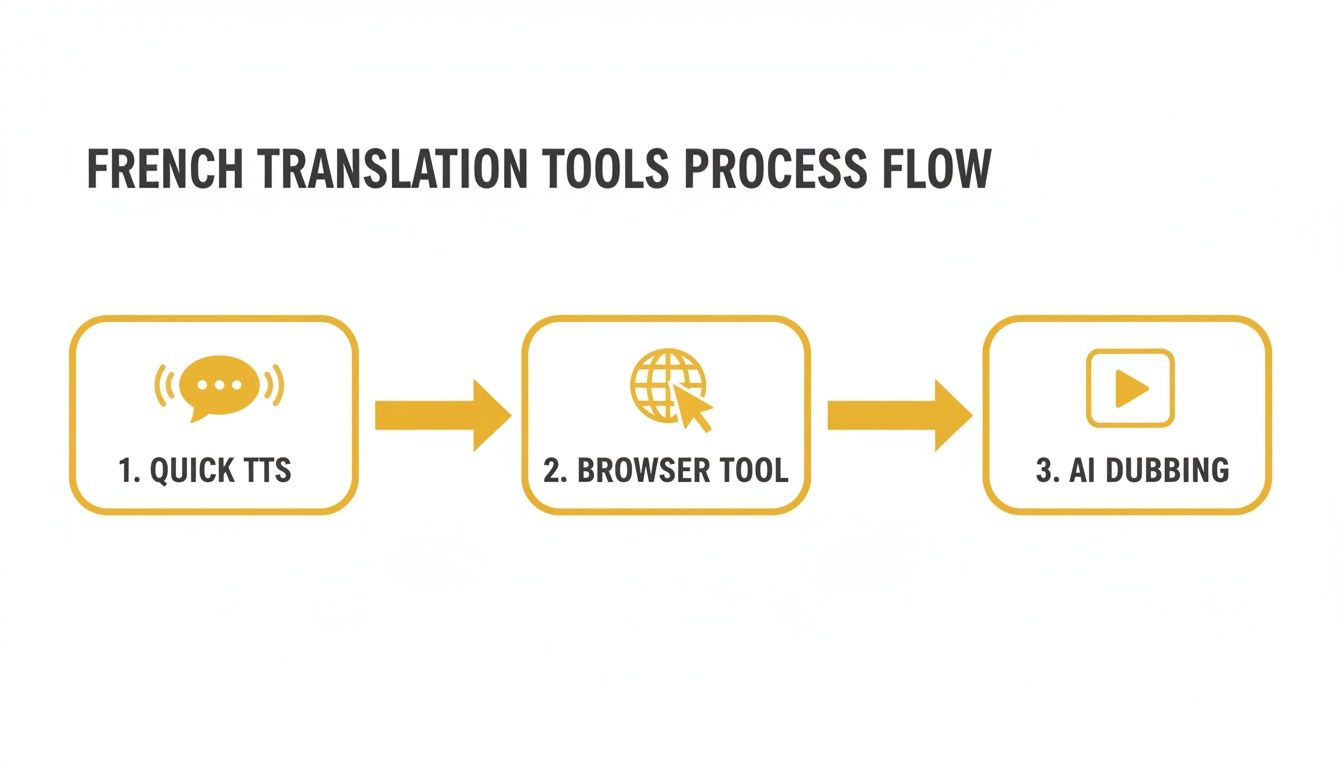
As you can see, each tool has its place, but AI dubbing is definitely the most powerful solution when you're working with video.
Getting Hands-On in the Studio Workspace
The real magic happens in TranslateMom’s Studio Workspace. This is the editor where you’ll fine-tune every little detail of your translation. The interface is laid out really intuitively, so you always feel like you’re in complete control of the final video.
I find the Split View in the editor especially useful. It puts the original English script right next to the AI-generated French translation, line by line. This makes it incredibly easy to do quality checks and tweak the language to fit cultural nuances. You’re not just getting a literal translation; you’re crafting one that feels right.
Below the text, you get a visual waveform of the original audio, which is perfect for nailing the timing. You can just drag the start and end points of each line to match the speaker's natural pauses and rhythm. This ensures the dubbed French audio syncs up perfectly with what’s happening on screen—no more awkward delays or people talking over each other. If you're curious about the tech that makes this possible, it's worth digging into understanding LLMs.
Adding Visual Polish and Branding
Of course, it’s not just about the audio. TranslateMom also lets you add some visual flair to your video, which is absolutely crucial for grabbing attention on social media feeds.
Head over to the Style tab, and you can add some slick "Karaoke" style effects. It’s a really popular animation that highlights words as they're spoken in the French dub. It looks great and helps viewers follow along. You can either pick a preset or customize the font, colour, and animation to fit your own brand.
To top it off, the Brand tab lets you upload your own logo or watermark and place it right on the video. It’s a small touch that makes your content look instantly more professional.
By putting together precise audio controls with these kinds of dynamic visuals, you can create a dubbed video that feels completely native to a French-speaking audience. For a more detailed walkthrough of the entire process, be sure to check out our complete guide on how to use an AI video translator.
Advanced Techniques for Polishing Your French Audio
Getting the initial AI-dubbed track is a fantastic first step, but the real magic happens in the final polish. This is where you elevate a good translation into a truly exceptional, culturally-aware piece of audio. Using a professional-grade translator english to french with sound like TranslateMom gives you the control you need to get it just right.
The first thing I always focus on is the rhythm and pacing of the dialogue. An AI might get the words right, but it often misses the subtle pauses and shifts in speed that make speech sound human. This is where a visual waveform editor is your best friend.
Fine-Tuning Pacing with the Waveform Editor
Inside TranslateMom's Studio Workspace, the audio waveform is basically a visual map of the original English dialogue. You can see exactly where someone took a breath, paused for dramatic effect, or rushed through a sentence. Your job is to make the new French audio follow that same natural beat.
- Drag to Adjust: You can literally just click and drag the start and end points of each subtitle segment right on the waveform. It’s perfect for lining up the start of a French sentence with the exact moment the speaker on screen begins to talk.
- Eliminate Dead Air: I often find myself tightening the gaps between lines. This gets rid of those awkward, robotic silences and gives the whole track a much more professional and engaging feel.
- Match On-Screen Cues: Pay close attention to what's happening on screen. Make sure the audio lines up perfectly with gestures, actions, or any other visual cues for a totally seamless experience.
Honestly, this hands-on timing adjustment is what makes the difference between a clunky voiceover and a believable performance.
Injecting Cultural Nuance into the Script
This is a big one. Direct, word-for-word translations are a recipe for disaster, especially with idioms. A phrase like "it's raining cats and dogs" means absolutely nothing when translated literally into French. You need the local equivalent, "il pleut des cordes," and that requires a human touch.
Before you even think about generating the final audio, pop open the Split View in the subtitle editor. It lets you see the original English and the French translation side-by-side, making it super easy to spot and fix phrases that need a bit of cultural adaptation.
This is also your chance to tweak the text for regional differences. You might want to swap a term used in Paris for one more common in Québec, making sure your content genuinely connects with the audience you're trying to reach.
Leveraging Dual Language Mode for Learning
If you’re creating educational content, TranslateMom's Dual Language Mode is an incredible tool. When you switch it on, it stacks both the English and French subtitles on the screen at the same time. This is a game-changer for language learners, as they can see the direct comparison in real-time and connect the spoken French with its written form.
Final Audio Checks and External Tools
Before you hit export, do one last listen-through. Pay special attention to the pronunciation of things like names, brand products, or any technical jargon. If the AI is stumbling on a word, you can often fix it by playing with the spelling a bit in the text editor to give the synthesis engine a nudge in the right direction.
For those projects that need that absolute top-tier, broadcast-quality sound, you might want to export the dubbed audio and take it into a dedicated audio editor. To really master the final polish, looking into the best editing software for podcasts can open up a world of advanced tools for things like noise reduction, EQ, and mastering to add that final professional sheen.
How to Export and Share Your French Content
Alright, you’ve put in the work to get your French audio and subtitles sounding perfect. Now it's time to get your masterpiece out there.
How you export your project really boils down to where people will see it. A social media manager has a totally different goal than a professional video editor, and a good translator english to french with sound needs to handle both scenarios seamlessly.
In TranslateMom, you’ve got two main paths for exporting, each tailored for a specific use case. Picking the right one is key to making sure your video looks sharp and plays flawlessly on any platform.
Burn-in for Social Media and Simplicity
The most straightforward route is to Burn-in (Export Video). This option permanently embeds your styled subtitles and the new French audio right into the video file itself. Think of it as "baking" everything together.
When you go this route, the platform creates a brand new MP4 file with the captions locked in. This is the go-to choice for platforms like TikTok, Instagram Reels, or X (Twitter), where viewers scroll quickly and expect open captions they can read without fumbling with settings.
Before you hit export, don’t forget to pop over to the Brand tab in the Studio. You can upload and place your logo or a custom watermark. It's a small touch that adds a professional look and makes sure your content is easily identified as it gets shared.
Download Subtitle Files for Professional Workflows
For the video pros and editors out there, the Download Subtitles option is where the real flexibility lies. Instead of getting a whole new video, this gives you just the timed text files.
You can grab your work in a few industry-standard formats:
- SRT (SubRip Text): This is the universal workhorse. It’s compatible with pretty much every video player and editing software out there.
- VTT (WebVTT): A more modern format built for web video, giving you more styling capabilities than SRT.
- Advanced Formats: For more complex styling requirements, you'll find other options like ASS available too.
This method is a lifesaver when you need to bring your French captions into software like Adobe Premiere Pro or Final Cut Pro. It gives you complete creative control over the final cut.
This kind of detailed localization is becoming crucial, especially in bilingual markets. Just look at Québec's English-speaking community, where an impressive 71% of English mother-tongue speakers are fluent in both languages. With a record 4.34 million Quebecers speaking English in 2021, tools like TranslateMom are essential for creating clean, accurate French audio that genuinely connects. You can dive deeper into these linguistic trends on clo-ocol.gc.ca.
Got Questions? I've Got Answers
Diving into audio translation for the first time can feel a bit daunting. You’ve probably got a few questions about how it all works, especially when you're aiming for a professional result. Let's tackle some of the most common ones I hear about using a translator english to french with sound.
Just How Natural Does the AI French Voice Sound?
Honestly, modern AI voices have come a long, long way. High-quality tools like TranslateMom use sophisticated neural networks that create French voices with surprisingly realistic pacing, intonation, and even emotion.
Is it a perfect one-to-one replacement for a seasoned human voice actor? Not quite every single time. But it's miles ahead of those old, robotic text-to-speech voices. For things like social media clips, e-learning modules, and corporate training videos, the quality is more than good enough to make your content feel natural and engaging to a French-speaking audience.
Can I Just Translate a Snippet of My Video?
Yes, absolutely. You're not stuck translating the entire thing from start to finish. Inside a tool like TranslateMom's Studio Editor, you get total control.
After the tool transcribes and translates everything, you can simply go in and delete any subtitle segments you don't want dubbed. This is super handy if you want to create a short clip, highlight a specific part in French, or even leave some of the original English audio for effect. The editor is built to be flexible.
What's the Real Difference Between AI Dubbing and Subtitles?
This is a big one. Subtitles are just text on the screen—your viewer has to read along. Dubbing, however, completely replaces the original English audio with a new French voice track.
A proper translator english to french with sound like TranslateMom does AI dubbing. It's a two-step process: first, it translates the text, and second, it generates a spoken French voiceover that’s timed to match the on-screen speaker.
Dubbing creates a much more seamless and immersive experience. Your audience can just watch and listen without the distraction of reading. This is a game-changer for visual-heavy platforms like YouTube and TikTok where you need to hold people's attention.
How Do I Handle Canadian French vs. European French?
Great question. This is where you separate the good translations from the great ones. Most AI models default to European French, but you can (and should) tweak it for your specific audience.
Within the subtitle editor, you can manually review the French text before generating the final audio. In TranslateMom, for instance, you can go through the script and swap out words and phrases for their Canadian French equivalents. This "human-in-the-loop" step is key for making sure your message truly connects with a Québécois audience and feels culturally on-point.
Ready to turn your English videos into awesome French content with audio that actually sounds good? With TranslateMom, you get everything you need to subtitle, translate, and dub your videos in just a few minutes. Give your first project a try for free and see how simple it is.