
Comparing hashes of E-14 election forms from Colombia’s Registry
4 min Machine translated
4 min Machine translated
In this video I'm going to show you how, when downloading the E- 14s from the Registrar's website, the hash locks are changed.
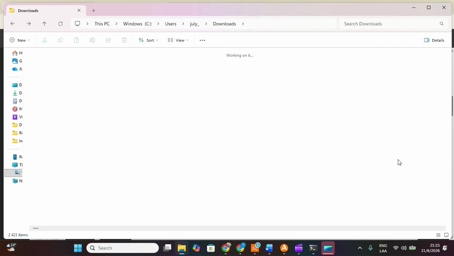
Here are several documents we've found with irregularities, but I'm going to give you the example of just one because it has already been modified. When it was downloaded, we realized that the hash lock had been modified. So, I'm going to show you with the first one I downloaded at 6: 13 p.m. Look at the document name,
letters and numbers. Let's double- click it. And here, what can we see?
Well, the Registrar's Office is reporting a non- digitized page. And on the se… on the second page, it shows us the signatures. Well, this was the first document I downloaded. The second docume… document, which was when I logged in again to the delegates' E- 14, the option that appears on the
registraduria.gov.co website, I downloaded it to this folder called" revision." So, you can see that letters and numbers appear, but it has exactly the same initial name. Look at it, you can compare them. What is the difference? That we are going to double- click it and, abracadabra!
now the votes have indeed appeared with the signatures. So, the votes appear and this time the signatures are there, the ones we had initially seen, as you can see here.
But the only difference is that the second document I downloaded, in fact, at… uh…
8: 42, just a few minutes ago, has the same name, but the second one shows the votes.
How do we know if the hash lock was modified or not?
Well, So we're going to go here to PowerShell and we're going to type Get- FileHash, FileHash, space, and we're going to go to the first one.
We're going to do... uh... right- click, we're going to click Copy as path.
And we're going to paste it in PowerShell after a space, we press enter. Here we can capture the hash lock of the first document we downloaded at 6: 13 p.m.
Now we repeat exactly the same step, but with the document that has the same name, but downloaded at 8: 42.
We right- click, we also click Copy as path, we go back to PowerShell and we're going to enter the same command: Get- FileHash.
Space, we copy it and... guess what? The hash is different. The hash that we initially downloaded at 6: 13 is totally different from the hash that we downloaded at 8: 42 p.m.
This means the following, and the question for the registrar is: When you say that the hash locks are not modified, what is it you intend to inform the public? Because, Mr. Registrar, welcome to the 21st- century citizenry, the citizenry that understands information technology and we know what it is that you are doing.
And we can… and we can see, and we can realize that you are lying to us when you say that the hash lock is not modified.
End of transcript · 504 words · machine translated
En este video les voy a mostrar cómo, al descargar los E-14 de la página de la Registraduría, están cambiados los candados hash.
Aquí hay varios documentos que hemos encontrado con irregularidades, pero les voy a dar el ejemplo de uno solo porque ya se modificó.
Cuando se descargó, nos dimos cuenta que el candado hash ha sido modificado.
Entonces, les voy a mostrar con el primero que descargué a las 6:13 de la tarde.
Miren el nombre del documento, letras y números. Vamos a darle doble clic.
Y aquí, ¿qué podemos ver? Pues la Registraduría nos está reportando una página no digitalizada.
Y en el se... en la segunda hoja nos muestra las firmas.
Bueno, este fue el primer documento que descargué.
El segundo documer... documento, que fue cuando ingresé de nuevo al E-14 de delegados, la opción que aparece en la página de registraduria.gov.co, lo descargué en esta carpeta que se llama revisión.
Entonces, ustedes lo pueden ver que aparecen letras y números, pero tiene exactamente el mismo nombre de inicial.
Mírenlo, lo pueden comparar. ¿Cuál es la diferencia?
Que le vamos a dar doble clic y, ¡abracadabra!, ahora sí aparecieron los votos con las firmas.
Entonces, aparecen los votos y esta vez se ponen las firmas, las que inicialmente habíamos visto, como lo pueden ver acá.
Pero la única diferencia es que el segundo documento que descargué, de hecho, a las... eh... 8:42, hace recién unos minutos, tiene el mismo nombre, pero presenta el segundo los votos.
¿Cómo nos damos cuenta si se modificó o no el candado hash?
Bueno, entonces vamos a ir acá a PowerShell y vamos a escribir Get- FileHash, FileHash, espacio, y vamos a ir al inicial.
Vamos a dar do... eh... clic derecho, vamos a dar Copy as path.
Y vamos a pegarlo en PowerShell después de un espacio, le damos enter.
Aquí podemos capturar el candado hash del primer documento que descargamos a las 6:13 de la tarde. Ahora repetimos exactamente el mismo paso, pero con el documento que tiene el mismo nombre, pero descargado a las 8:42. Damos clic derecho,
damos también Copy as path, volvemos a PowerShell y vamos a meter el mismo comando: Get- FileHash.
Espacio, le damos copiar y... ¿adivinen qué?
El hash es diferente. El hash que inicialmente descargamos a las 6:13 es totalmente diferente al hash que descargamos a las 8:42 de la tarde.
Esto quiere decir lo siguiente, y la pregunta al señor registrador es: Cuando usted dice que no se modifican los candados hash, ¿qué es lo que pretende informar a la ciudadanía?
Porque, señor registrador, bienvenido a la ciudadanía del siglo XXI, la ciudadanía que entiende de las tecnologías de la información y sabemos qué es lo que ustedes están haciendo.
Y nos podemos... y podemos ver, y podemos darnos cuenta que usted nos está mintiendo cuando dice que el candado hash no se modifica.
 2:59 Atocha authorizes train 2080 to disconnect and reconnect LZB
 2:56 Madrid–Seville Train Collision: LZB, ASFA and the Investigation
 4:50 Warnings of a Possible War and Emergency Stockpiling
 3:58 Atocha instructs train driver to disconnect LZB after Urda failure
 2:12 Small Plane Wreckage and Apparent Human Remains at the Scene
 1:17 Small plane debris scattered after crash
 1:08 Doña Florinda Sends Quico for Bread and Stays with El Chavo
 1:32 Colombian in Ukraine alleges assault and asks to return home
 2:19 Lamine Yamal vs Alavés: Yusi duel, penalty appeal and two goals
 0:53 Spain and Israel: Government Criticism and Defense Cooperation
 0:48 Ramayana Movie Review After the Los Angeles Premiere
 2:52 Rescue of a Lioness With a Bone Stuck in Her Jaw
 iPhone app Translate videos on your iPhone Paste a TikTok, Instagram or X link, add subtitles in your language and save the video to Photos.

TranslateMom transcribes and translates videos from X, TikTok, YouTube and Instagram. Paste a link and you get a page like this one, in your language.