English-to-Spanish audio translation can mean several different things: interpreting live speech, recording a human voice-over, generating a translated voice with text-to-speech, or dubbing a recorded video. The right method depends on whether the source is live or recorded, how closely the new speech must follow the speaker, and how much review the result needs.
TranslateMom is designed for recorded audio and video, not live conversation. It can turn speech into a transcript, translate that transcript into Spanish subtitles, and, when Dubbing is selected, generate a spoken Spanish audio track. Because names, idioms, accents, and specialist terms can be mistranscribed or translated poorly, review the text and audio before publishing.
English-to-Spanish Translation Methods With Spoken Audio Output
All four methods below produce Spanish that listeners can hear, but they solve different problems.
| Method | How it works | Best for | Main trade-off |
|---|---|---|---|
| Live interpretation | An interpreter renders English speech into Spanish as it is spoken. | Meetings, calls, events, and two-way conversations. | Requires a person or a service built for real-time speech. |
| Human voice-over | A translator prepares a Spanish script and a voice actor records it. | High-stakes, brand-sensitive, or performance-led content. | Offers the most control, but usually takes more time and coordination. |
| Translated text-to-speech | English is transcribed and translated, then a synthetic voice reads the Spanish text. | Narration, explainers, and audio versions of written material. | Timing and speaker identity may not match the original recording. |
| AI video dubbing | Software transcribes the recording, translates it, and generates a timed Spanish audio track. | Localizing recorded videos while keeping speech aligned with the source. | The draft still needs review for wording, pronunciation, voice choice, and timing. |
If the goal is a Spanish version of an existing video, AI dubbing or a human voice-over usually fits the intent. If the goal is a live bilingual exchange, use an interpretation service instead. Subtitles are useful alongside any recorded-media method, but subtitles alone are text output, not spoken audio.
Why Spanish Audio Translation Matters
The hunger for high-quality Spanish vocal content is blowing up everywhere, from social media to professional training videos. Let's be real: static text translations just don't cut it anymore. They can't grab and hold the attention of today's fast-paced, digital-first audience.
To stay in the game, creators and businesses have to deliver immersive audio and video. This means going beyond simple subtitles and diving into more advanced tools, like AI-powered voiceovers.
This isn't just about entertainment, either. It's a critical need in many fields. Take California, where over 10.4 million residents speak Spanish at home. The numbers don't lie: in a single year, the state's court system provided 562,561 Spanish interpretations, which was a staggering 89% of all its language services. This data, which you can dive into deeper at the Migration Policy Institute, shows just how immense the demand for accurate, real-time vocal communication is.
To put it in perspective, here's a quick look at why this matters for creators.
Why Vocal Translation Matters: A Snapshot
| Sector | Key Statistic | Implication for Creators |
|---|---|---|
| Legal & Public Services | 89% of all language services in CA courts are Spanish. | High demand for precise, certified-quality vocal translation for official content. |
| Social Media | TikTok has over 1 billion monthly active users globally. | Short-form videos with dubbed audio and burned-in subtitles are essential for engagement. |
| E-Learning | The global e-learning market is projected to reach $457.8 billion by 2026. | Dubbed courses and dual-language subtitles significantly broaden your student base. |
| General Population | Over 10.4 million Californians speak Spanish at home. | A huge, local audience is waiting for content that speaks their language naturally. |
These numbers paint a clear picture: ignoring Spanish-speaking audiences means leaving a massive opportunity on the table.
The Rise of Vocal-First Content
So, why the big shift to vocal? It's simple. It’s a much more personal and convenient way to consume information. People can multitask while listening to a podcast or an audiobook, and videos with good dubbing feel way more natural and engaging than just reading subtitles.
Here's where we're seeing the biggest impact:
- Social Media: Platforms like TikTok and Instagram are all about short, punchy videos. Dubbed audio and those slick, karaoke-style captions are now the standard for going viral.
- E-Learning: Offering dubbed educational videos or dual-language subtitles makes your courses accessible to a much larger group of students.
- Podcasting: Translating your podcast episodes can open up your show to entirely new markets with surprisingly little extra work.
For creators, the message is simple: if your content only speaks English, you're invisible to a huge potential audience. The good news is that the tools to fix this are easier to use than ever.
Adapting to a Multilingual Reality
Modern tools can reduce the manual work. With a platform like TranslateMom, you can create a draft English-to-Spanish audio translation for recorded media and then review it in the editor.
You can paste a public YouTube link or upload a file, select Spanish, and choose the "Dubbing" service. The platform will generate a new AI audio track. From there, use the Studio editor to review the translation and timing. If you're new to the concept, our guide explaining what dubbed means is a useful place to start.
How To Prepare Content For A Better Translation Draft
Before you even think about hitting 'translate,' let's talk about what really makes or breaks an english to spanish translation vocal project: the quality of your original content. It’s a classic case of garbage in, garbage out. You wouldn't expect a Michelin-star meal from spoiled ingredients, right? The same logic applies here—a high-quality, natural-sounding Spanish track starts with pristine source files.
The absolute number one priority is clean audio. Things like background noise, overpowering music, or crosstalk (where people talk over each other) are the enemy of good translation. They completely throw off the AI, muddying its ability to detect voices accurately. This leads to a messy transcription, and you can guess what happens next: a flawed Spanish dub.
Cleaner source material can improve the first draft, although it cannot guarantee an error-free result. Learning the basics of cleaning up audio for professional sound can make a difference. And if you’re working with video, our guide on background noise removal for video has more targeted tips.
Your Script Is Your Greatest Asset
Clean audio is only half the battle; a clear, well-paced script is just as vital. When speakers rush their words, mumble, or pepper their speech with unexplained jargon, they create a minefield of ambiguity for the AI. The model might get the words right, but it will almost certainly miss the intended meaning, spitting out a literal but nonsensical Spanish translation.
Here’s a quick checklist to prep your script for success:
- Pacing: Get your speakers to maintain a steady, deliberate pace. This gives the AI clean phonetic data to analyze.
- Clarity: No mumbling! Make sure every word is pronounced crisply and distinctly.
- Idioms and Slang: Jot down any English idioms or culturally specific phrases. Something like "bite the bullet" makes zero sense when translated literally. Your job is to find a Spanish equivalent that captures the spirit of the phrase, not just the words.
Pro Tip: Go through your script and add notes on tone. Is a line meant to be sarcastic? Humorous? Urgent? The AI can’t read minds, so it won’t pick up on that emotional subtext. These annotations are a lifesaver when you get to the editing stage.
Preparing For a Tool Like TranslateMom
When you’re using an automated platform, this prep work matters. A clean audio file gives TranslateMom's voice detection a better chance of separating speech from silence and producing a useful first draft. Results still vary with recording quality, accents, overlapping speech, and specialist vocabulary.
By feeding the system clean audio and a clear script, you aren't just making the AI's life easier. You're setting the stage for a final product that sounds authentic and truly connects with your Spanish-speaking audience. It’s the foundational work that separates a clunky, robotic translation from a polished, professional one.
A Practical Walkthrough of AI Vocal Translation
Theory is great, but let's get our hands dirty. The best way to really understand the power of an English to Spanish translation vocal workflow is to actually walk through it. I’m going to use a tool I know well, TranslateMom, to show you how a seemingly complex process is really just a series of simple, manageable steps.
From the moment you start a new project, the path from your English video to a professionally dubbed Spanish version is designed to be straightforward. It doesn't matter if you're a seasoned video pro or a content creator just dipping your toes into localization.
Getting Your Content Into the System
It all kicks off on the New Task screen. You’ve got two main ways to get your media loaded up, and both are built for speed. You can either drag and drop video files directly into the browser or, for a quicker start, press the F key on your keyboard to instantly open the file picker.
If your content is already living online, you can paste a URL from major platforms like YouTube, Twitter (X), TikTok, or Instagram. The app will automatically import the video for you, so you don't have to bother with downloading and re-uploading.
Setting Up Your Vocal Translation
With your video loaded, it’s time to tell the AI what you want it to do. This part is incredibly quick.
- Source Language: You’ll select English, since that's what's spoken in your video.
- Target Language: Next, choose Spanish for your new audio track.
- Choose a Service: For what we're doing, you'll pick Dubbing. This tells the system to generate a brand new AI audio track in Spanish, essentially a complete voice-over.
This whole setup takes just a few seconds. Once you confirm, the AI gets to work transcribing, translating, and generating that new vocal track.
Fine-Tuning in the Studio Workspace
After the AI does its initial pass, you land in the Studio. This is the heart of the platform, where you get to put your human touch on the AI's work. The layout is split to make editing as efficient as possible, with a special video player on one side and the subtitle editor on the other.
The subtitle editor is where the real magic happens. It gives you a scrolling list of every single line of translated text. You can click on any line to edit it on the spot. The video player automatically pauses while you're typing, letting you focus completely on the text without any distractions.
One of the most critical features for accuracy is the Split View. A simple toggle lets you see the original English text right next to your Spanish translation. It’s an indispensable tool for checking context and making sure your edits nail the original intent.
You can also adjust the timing of each line. The visual audio waveform helps you align subtitle start and end points with the natural pauses and flow of speech in the video.
Getting familiar with these hands-on steps is useful because setup and human review matter across language pairs. Timing controls help you improve synchronization, but the full video still needs a final watch and listen.
Refining Your AI Dubbing And Subtitling
Once the AI has done its first pass on your English to Spanish translation vocal, the real work—and the real fun—begins. This is where your human touch comes in to turn a decent automated output into a polished, natural-sounding final product. It’s less about fixing mistakes and more about finessing the details: the tone, the timing, and the cultural nuances that make the content feel authentic.
The first thing you'll want to do is pick the right voice. Modern AI gives you a whole range of vocal styles, from high-energy and casual to something more formal and serious. Take a minute to listen to a few different options. Does the voice genuinely match the personality of the original speaker? A voice that feels out of place can be just as distracting as a bad translation.
This simple flowchart shows you just how straightforward the process is.
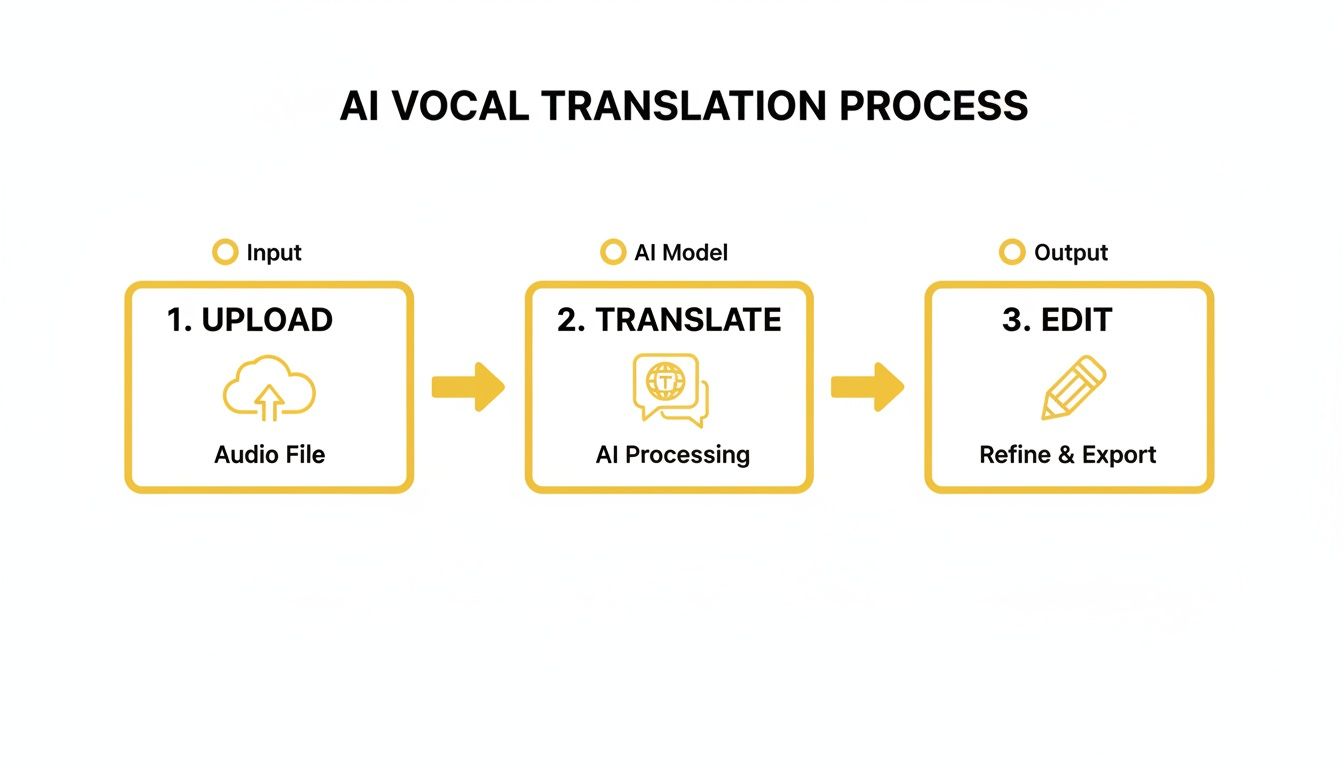
As you can see, it's a clear path from your source file to the final export. That middle step, "Refine & Edit," is where you'll make all the difference.
Mastering Timing and Synchronization
For a usable dub, timing matters. The Spanish audio should follow the on-screen action and natural pauses closely enough to remain easy to understand. TranslateMom provides timing controls for review, but it does not promise automatic lip-sync.
Instead of relying only on playback, you can use the audio's visible peaks and valleys as timing cues. Drag the start and end points of each translated line, then play the section back to check the speaker's cadence and correct early or late captions.
Pro Tip: Keep an eye out for "dead air" on the waveform—those little moments of silence in the original audio. If you can align your translated segments to these natural breaks, the final dub will feel so much more organic and less like a robotic voice-over.
Advanced Subtitling for Maximum Impact
Good captions are one thing, but you can do so much more to make your content pop. If you're creating stuff for social media, you have to try karaoke-style subtitles. In TranslateMom's Style tab, you can select presets or manually configure animations where words highlight as they’re spoken. It’s a fantastic way to grab and hold attention on platforms like TikTok and Instagram.
For educational videos, there's another great feature called Dual Language Mode. It stacks the English and Spanish subtitles right on top of each other, turning your video into an amazing learning tool for anyone studying a new language.
This is a huge deal for educators. Think about this: in California's public schools, a staggering 81.9% of all English learner students speak Spanish at home. Creating dual-language or dubbed content is a powerful way to support these students, especially in elementary grades where visual and auditory learning is so critical. You can see more of these demographics on the CDE website.
Editing for Cultural Authenticity
The last and most crucial step is to read through the translated text and edit it for cultural flow. A direct, word-for-word translation might be technically correct, but it can often sound clunky and lifeless to a native speaker.
- Idioms and Slang: Swap out English expressions for their true Spanish equivalents. Don't just translate "it's raining cats and dogs"—use "Está lloviendo a cántaros." It means the same thing, but it's what people actually say.
- Formality: Think about who is speaking to whom. Should you be using the informal tú or the more formal usted? Getting this right makes a huge difference in the tone.
- Flow and Rhythm: Read the Spanish sentences out loud. Do they roll off the tongue? Sometimes, just reordering a phrase or swapping one word for a synonym can make it sound much more natural.
The Split View in the subtitle editor shows the original English and Spanish translation side by side, providing context for edits. For a deeper look at these strategies, read our guide on subtitling and translation best practices.
How To Export And Distribute Translated Content
Once you have reviewed your **English-to-Spanish audio translation**, the next step is choosing an appropriate export.How you export your finished video is just as important as the translation itself. Different platforms have their own quirks and best practices, and choosing the right format can make or break your reach and engagement.
Inside a professional tool like TranslateMom, you’ll find a couple of key export options. Understanding which one to use, and when, is the secret to making sure your hard work actually pays off.
Burn-in vs. Downloadable Subtitles
Your first choice is whether to Burn-in (Export Video). This basically "bakes" your subtitles, karaoke effects, or any custom logos directly onto the video frames, creating a brand new MP4 file. It's an all-in-one package, ready to upload anywhere.
The other option is to Download Subtitles. This just gives you the text files themselves in standard formats like SRT or VTT. You can then take these files and use them in other editing software or upload them separately alongside your video on certain platforms.
This isn't just a technical decision. It directly affects how people will see and interact with your content, and even how well platforms can discover it.
Choosing The Right Export For Your Platform
The best way to export comes down to one thing: where are you posting? For the fast-paced, visual world of short-form video, burned-in captions are a must.
- Instagram & TikTok: Always go with the Burn-in option. Think about it—most content on these platforms autoplays on mute. Open captions are your only shot at grabbing someone's attention in that first second and getting your message across, even with the sound off.
- YouTube: For YouTube, your best bet is to Download Subtitles and upload the SRT file separately. Why? YouTube's algorithm can actually read SRT files, which gives your video a serious SEO boost. It helps your content show up for a much wider Spanish-speaking audience searching for your topics.
- Premiere Pro / Final Cut: If you’re sending your video back to a bigger editing project, just download the SRT or VTT file. This gives you total control to style, animate, and position the captions exactly how you want them within your main edit.
The real goal here is to make your content accessible everywhere your audience hangs out. This is especially vital in regions with large Limited English Proficient (LEP) populations. In California, for example, a staggering 52.1% of foreign-born residents speak English less than 'very well,' making accurately exported vocal tracks and subtitles absolutely essential. You can dive deeper into these insights in California's language access report. By choosing the right export format, you're not just sharing a video—you're making sure it truly serves the communities that need it most.
Frequently Asked Questions About Vocal Translation
When you start a project to translate English audio into Spanish, a few common questions always pop up. Getting these sorted out from the beginning will save you a ton of headaches and help you feel more confident about the final product. Let's tackle the big ones.
How Does AI Accuracy Stack Up Against a Human Translator?
Today's AI is incredibly fast and surprisingly accurate for most general content. It's a powerhouse for getting the initial transcription and translation done, saving you hours of work.
But when it comes to the tricky stuff—like cultural nuances, specific jokes, or complex idioms—a human touch is still king. The best approach is a hybrid one: let the AI do the heavy lifting, then have a real person come in to add that final layer of polish.
A workflow I’ve found really effective is to let the AI create the first draft. Then, you can jump into an editor to clean it up. In TranslateMom, for example, the Split View in the Studio is perfect for this. It lets you see the AI's Spanish translation right next to the original English, making it super easy to catch and fix any phrasing that sounds a bit off.
What’s the Best Way to Handle Idioms?
Translating idioms word-for-word is a classic mistake. "Bite the bullet" becomes a nonsensical phrase in Spanish if you translate it literally. The real secret here is localization—finding a Spanish phrase that captures the same feeling and meaning, even if the words are completely different.
A good habit to get into is to make a list of any idioms in your original script before you even start. A quick search for their Spanish equivalents will make your final vocal track sound far more authentic.
Can I Translate a Video With Multiple Speakers?
You can process recordings with several speakers, but overlapping voices and similar-sounding speakers can reduce transcription and dubbing quality. Review the result line by line and listen to the complete export.
Where speaker detection is available, it can help segment dialogue, but it should be treated as an editable first pass rather than proof that every voice has been identified correctly.
Ready to localize a recorded video? With TranslateMom, you can generate subtitles, translations, or a dubbed draft and review the result before export. Start your project.